Lecture 13 — Introduction to Embedded C Programming
The first lecture of the high-level programming block: what a C program is made of, set against the assembly the course has just finished. A C program is made of five things — variables, functions, constants, operators, control flow — and the sections below take them in that order. The evergreen treatment is split across c-language-basics (structure, variables, functions, constants), c-operators and c-control-flow.
Course overview
The three blocks of the course, from Lecture 1:
| Block | Status |
|---|---|
| High-level Programming — Embedded C programming for the ATmega324A | the current block |
| Low-level Programming — ISA and Assembly language programming for the ATmega324A | finished as a topic, still in use |
| Digital Logic Design — Hardware aspects of a microprocessor | done |
Assembly is finished as a topic but not left behind, because every C construct here is explained by what it compiles down to.
What the course expects in C
The expectation in this course is to:
- be able to write small C programs and functions from scratch
- understand the meaning of C programs
- be able to write/modify C programs
Lectures can’t teach programming. It takes practice.
- There will be some self-learning examples on EdForum
- Coding examples in Labs 11–16 will be using embedded C
From Lab 11 on, the lab work is C, and the assembly of Labs 9 and 10 (week5-lab-avr-assembly-one, week6-lab-avr-io-ports) is what it sits on.
C program — basic structure
- There must be a function called
main— this function is executed when the program starts - Blocks of code enclosed by braces
{ } - C statements must end with a semicolon
; - C statements are case sensitive —
variableis not the same asVariable - Comments are within
/* … */or from//to end of line
The program sits in a file such as name.c. main() is at the top with its args in the brackets, then a brace and a column of statement lines, each ending in a semicolon. C = A + B is an expression, the thing C lets you write that assembly does not. There are two routes into program memory, drawn in Figure 1.
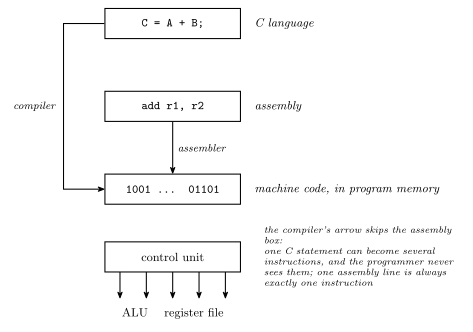
Figure 1: What happens to one line of C. Two routes converge on program memory: the long compiler arrow runs from the C statement straight to the machine code, and a short assembler arrow drops the assembly line into the same place. Under the machine code sits the control unit, fanning out to the ALU and register file. The bit string 1001 ... 01101 is a placeholder, not a real encoding.
Figure 1 is the frame for the whole block. The bottom three boxes are Lectures 9–12 (fetch-decode-execute-cycle, avr-instructions); C adds one more layer on top, and a compiler to cross it. The compiler’s arrow goes past the assembly box straight into program memory, because the crossing is no longer one-to-one — a single C = A + B; may become several instructions, and the programmer never chooses which registers or even sees the assembly. The asymmetry in short: assembly ↔︎ machine code, 1:1; C → machine code — see 2026-09-10-more-c-programming-on-the-avr.
The five things
| ① | variables |
| ② | functions |
| ③ | constants |
| ④ | operators |
| ⑤ | control flow, e.g. if … else |
The area-of-a-circle formula \(A = \pi r^2\) is the running example for the first three: \(A\) and \(r\) are variables, \(\pi\) is a constant, and the multiplication and squaring are operators. Five sections below carry the matching number — variables, the function example, constants, operators and if.
① Declaring variables
Declaration: type-name variable-name, variable-name …; — the comma separates names of the same type, the semicolon ends the declaration.
| Example | Type | Size and range |
|---|---|---|
char c; |
Single byte (two’s complement) | 8 bit, −128 … 127 |
unsigned char x; |
Single byte (unsigned) | 0 … 255 |
int day; |
Integers (size is machine dependent). Integers can be unsigned or signed (two’s complement). | AVR: 16 bit |
unsigned int count; |
(same) |
Two things to remember:
charis a number. It is the same 8-bit two’s complement integer the whole hardware block was about (binary-number-representations); the name just says it is big enough for a character.unsigned charis the 0–255 reading of the same byte.inthas no fixed size. On the AVR it is 16 bits — two of the machine’s 8-bit cells, which is why Lecture 14’s pointer arithmetic steps by two. On a desktop it is usually 32. Code that assumes one or the other breaks when moved.
char, int, float and double are among the data types supported by C. float and double are the floating-point types the AVR has no hardware for (instruction-set-architecture has the tables), so every floating-point operation is a library call (floating-point-numbers).
Any value can be treated as a boolean — zero means false, non-zero means true. In short: == 0 FALSE, ≠ 0 TRUE. There is no separate boolean type in the C the course uses. The if statement below comes back to this.
② Function example
/*
  Return the average of two integers
  (result will be rounded towards 0)
*/
int average(int a, int b) {
    int avge;

    avge = (a+b)/2;

    return avge;
}
int at the front is the return type, average is the name, and int a, int b are the args. The three lines inside the braces are the statements, each ending in a semicolon. In avge = (a+b)/2; the = is an assignment operator, and (a+b), (a+b)/2 and the whole line are expressions; the outer expression is a statement. return avge; is where the function returns a result when finished.
The comment says rounded towards 0. \(\frac{1+2}{2} = 1.5\), but average(1, 2) is 3/2, integer division, and the .5 is simply dropped, giving 1. Division of two ints in C is integer division; the fraction never exists to be rounded.
Function definitions
The template:
return-type function-name (arg-decl)
{
    variable-declarations;
    …
    statements;
}| Part | Meaning |
|---|---|
return-type |
What type is returned by the function, e.g. int or void |
function-name |
Name of the function, e.g. main |
arg-decl |
Argument (parameter) declaration, e.g. int a, float b |
variable-declarations |
Variables used only within the function |
statements |
The code which actually does stuff |
void is the return type for a function that returns nothing. The only within the function is scope: avge in the example exists while average runs and is gone afterwards — it has no address anyone outside can name.
③ C constants
Character constants — use single quotes, e.g. 'a', 'b', '1' etc. Some special characters are backslash escaped:
'\n' |
newline |
'\'' |
single quote |
'\t' |
tab |
'\\' |
backslash |
String constants — use double quotes (can include backslash escapes), e.g. "abc \n \" hello\t".
Integer constants
| Base | Examples | |
|---|---|---|
| Decimal | 3, -27, 65535, +5 |
|
Hexadecimal (leading 0x) |
0x5F, 0xFFFF, 0xDEADBEEF |
|
Octal (leading 0) |
0377 |
= 255 decimal |
Floating point constants — include a decimal point (.) and/or e for exponent: 3.1416, -7., 6.02e23, -5.2e-2. 7 is an integer, 7. is floating point.
In ASCII, A–Z is 65–90, a–z is 97–122, 0–9 is 48–57. That is what makes '1' a character constant and not the number one: '1' is 49. In \(A = \pi r^2\), \(\pi\) is the constant in the running example.
The octal row is the trap to remember. A leading zero changes the base. 0377 is 255, not 377, and 010 is 8. Nobody writes octal on purpose in this course, but a zero-padded decimal will be read as it.
④ Some C operators
Binary operators, by group:
| Group | ||
|---|---|---|
+ |
addition | arithmetic — e.g. A + B, A − B |
- |
subtraction | |
* |
multiplication | |
/ |
division | |
% |
remainder (integer) | |
> |
greater than | comparison |
>= |
greater than or equal | |
== |
equal | |
!= |
not equal | |
< |
less than | |
<= |
less than or equals | |
& |
bitwise AND | logical — this one group takes in both the bitwise and the logical rows |
\| |
bitwise OR | |
^ |
bitwise XOR | |
&& |
logical AND | |
\|\| |
logical OR | |
= |
assignment |
Unary operators
| Example | ||
|---|---|---|
! |
logical not | !A ≡ Ā |
~ |
one’s complement (invert) | ~A |
- |
two’s complement (negate) | |
++ |
increment (prefix or postfix) | |
-- |
decrement (prefix or postfix) |
The pair to keep apart is == and =: == asks, = does. = copies the right side into the left, so a = b is best read as a ⇐ b. Writing = where == was meant is legal C — it assigns, then tests the assigned value — and is the classic silent bug.
Two more pairs look alike and are not: & against && and | against ||. The single forms are the eight-parallel-columns operations of bit-masking — AND, OR, EOR in avr-instructions — and the double forms are the true/false connectives of boolean-algebra. ~ is the COM instruction and unary - is NEG. The full reference is c-operators.
More operators — bit-shifting and assignment
a << b |
means a shifted left by b bits |
a >> b |
means a shifted right by b bits |
a = b |
means a is assigned the value of b, i.e. a ⇐ b |
a += b |
is shorthand for a = a + b |
Similarly -=, *=, /=, %=, &=, |=, ^=, <<=, >>=.
Examples, with the shifts worked in bits:
| Example | Worked |
|---|---|
1 << 5 is \(1 \times 2^5 = 32\) |
000001 << 5 ⇒ 100000 ⇒ 32, with five zeros now to the right of the 1 |
3 << 4 is \(3 \times 2^4 = 48\) |
0000011 << 4 ⇒ 0110000 ⇒ 48, with four zeros now to the right of the 11 |
a += 1 same as a++ |
a = a + 1, a++ |
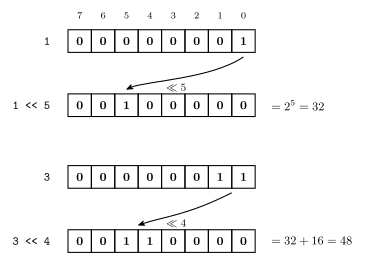
Figure 2: The two shift examples worked in eight bits. The 1 in 1 << 5 walks five places to the left and lands at bit 5, which is \(2^5 = 32\); the 11 of 3 << 4 walks four places and lands at bits 5 and 4, \(32 + 16 = 48\). The curved arrows span the zeros the 1s hop over.
1 << n is the idiom that matters: it is the mask with only bit \(n\) set, and Lecture 14 connects it to named flags. This is lsl from 2026-09-03-instruction-set-architecture-part-2 with the count written as a number instead of repeated \(n\) times — and the same ×2-per-place reading applies.
Postfix/prefix increment and decrement
An example, with the running value of a for each line:
int a,b,c,d,e;
a = 4;
b = a++;    /* b=a;   a=a+1; */
c = --a;    /* a=a-1; c=a;   */
d = ++a;    /* a=a+1; d=a;   */
e = a--; /* e=a; a=a-1; */| Line | a before |
What happens | a after |
|---|---|---|---|
b = a++; |
4 | b=4, then a=5 |
5 |
c = --a; |
5 | a=4, then c=4 |
4 |
d = ++a; |
4 | a=5, then d=5 |
5 |
e = a--; |
5 | e=5, then a=4 |
4 |
After these statements, values are a=4, b=4, c=4, d=5, e=5.
The rule:
- Postfix (
a++) — use value, change value. The change happens after the value is used. - Prefix (
++a) — change value, use value. The change happens before the value is used.
The comments in the code are the whole definition: each line is two statements, and the only question is which comes first. The two-statement expansion is also why values[9] = values[8]++; in Lecture 14’s array example copies the old values[8].
Worked: what value will b have?
a = 1;
b = 3;
b += a++;
The choices are 1, 2, 3, 4, 5, 6 or none of the above.
b is 4. The line is b = b + a++, and it splits into two statements exactly as above: ① b = b + a ⇒ b = 4, ② a = a + 1 ⇒ a = 2. Postfix means the + 1 on a lands after a’s old value has already gone into the sum. The answer 5 comes from applying the increment first, which is what ++a would have done.
⑤ if statement
The if statement is control flow, the fifth and last of the five things.
if (expression) stmt else stmt — the first stmt runs when the expression is TRUE and the else stmt runs when it is FALSE.
- The
elseclause is optional. - Expressions: C interprets any 0 value as false, anything else as true.
if(a)meansif(a != 0)— ≠ 0 TRUEif(!a)meansif(a == 0)— == 0 FALSE
stmtcan be replaced by multiple statements enclosed in braces{ }.
There are three kinds of control flow, drawn in Figure 3:
| sequential | selection (decision) | repetition |
|---|---|---|
| statements, one after another | if … else |
for; while |
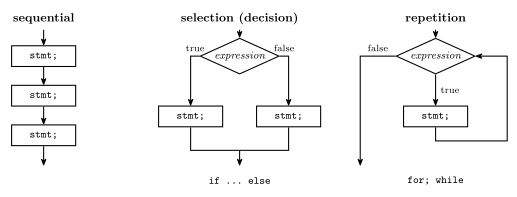
Figure 3: The three shapes a C program’s control can take. Left, the default: statements run one after another. Middle, selection: the expression is tested and exactly one of the two branches runs. Right, repetition: the body runs and control returns to the test until the test is false.
Selection is the if statement above. Repetition arrives in Lecture 14 as the for loops that walk an array and the while(1) that every embedded program runs inside — see c-control-flow for all three together.
The if(a) shorthand and the boolean rule under variables are the same fact stated twice, and they connect straight back to hardware: the compiled test is a compare against zero followed by a conditional branch, cp/tst then breq/brne in avr-instructions — the Z flag is what “is it zero” means to the machine.
See also
- c-language-basics — structure, variables and types, functions, constants
- c-operators — every operator here, with the bitwise/logical split and the shift rules
- c-control-flow —
if,while,for, and the truthiness rule - 2026-09-10-more-c-programming-on-the-avr — Lecture 14, which puts this on the AVR
- compilation-and-linking — what lies behind the compiler’s arrow: object files, the linker and libraries
- 2026-09-03-instruction-set-architecture-part-2 — the shifts and 16-bit arithmetic this lecture’s operators compile to
- bit-masking · avr-instructions · binary-number-representations