Memory Hierarchy and Cache
Why a computer has several layers of memory rather than one, and how a cache makes a slow main memory look fast. This note covers the memory hierarchy from registers down to tape, how speed, capacity and cost per bit change from one level to the next, what a cache is and why it works, the three cache levels, and the average access time with a cache. The technologies at each level are in memory-technologies, and the disk level in magnetic-disks. First met in 2026-10-22-memory-disks-and-files.
The memory hierarchy
No single memory is fast, large and cheap at once. Fast memory costs more per bit, so it is built small. Cheap memory is slow, so it is built large. A computer therefore stacks several kinds, with the fastest and smallest next to the processor and the largest and cheapest furthest away.
| Level | Built from | Typical capacity | Cost per bit | Access time, order of magnitude |
|---|---|---|---|---|
| Registers (r0 to r31 on the AVR) | flip-flops, inside the CPU | under a kB | highest | ~1 ns |
| Cache (L1, L2, L3) | SRAM | ~MB | high | ~10 ns |
| Main memory | DRAM | ~GB | moderate | up to ~1 µs |
| Magnetic disk (and SSD) | magnetic platters, or flash | ~TB | low | ~1 to 10 ms |
| Tape, optical disk | magnetic tape, optical discs | ~PB, across a library of them | lowest | ~100 ms and up; a tape that must wind takes seconds |
Going down the hierarchy:
- capacity grows, from bytes to petabytes;
- cost per bit falls, from the most expensive to the cheapest;
- access time grows, by roughly a factor of 10 to 1000 per level.
The CPU works directly only with the top. Data moves up the levels as it is needed and back down when it is not.
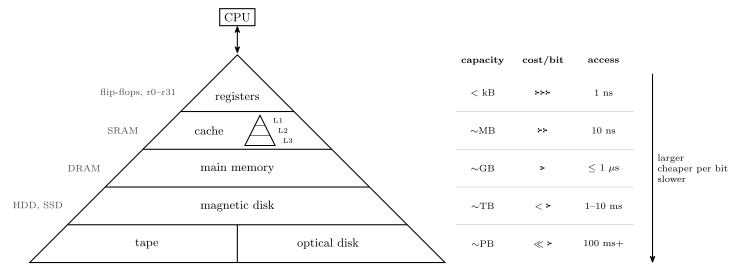
Figure 1: The memory hierarchy, with the CPU at the apex. Each level is larger, cheaper per bit and slower than the one above it: registers are under a kilobyte and answer in about a nanosecond, while a tape or optical library holds petabytes and takes a tenth of a second or more. The width of each band suggests its capacity. The cache is itself a small hierarchy of three levels, L1 to L3, drawn as a pyramid within its band. The figures on the right are orders of magnitude, not specifications.
Cache memory
CPUs are faster than main memory. A processor can execute an instruction in well under a nanosecond, while DRAM takes tens to hundreds of nanoseconds or more to answer. Memory as fast as the CPU exists (SRAM), but very fast memory is expensive, so it cannot be the whole of main memory. If the CPU always had to wait for main memory, performance would suffer badly: most of its time would be spent idle.
A cache is the compromise: a small amount of very fast memory combined with the larger, slower main memory. The most commonly used memory words are kept in the cache. On every access the CPU looks in the cache first:
- if the word is there, a hit, it is returned at cache speed;
- if not, a miss, it is fetched from main memory over the bus, and a copy is kept in the cache in case it is wanted again.
The average access time is greatly reduced if many words are found in the cache.
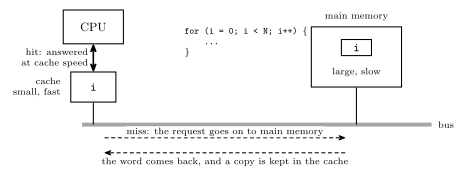
Figure 2: A cache between the CPU and the bus. The CPU asks the cache first; only on a miss does the request travel along the bus to the much slower main memory. A loop counter i is the typical resident: the first read of i misses and brings a copy into the cache, and every later read of it, once per iteration, is a hit that never touches the bus.
Why a cache works
A cache only helps if the words a program uses next are mostly the ones it used recently. They are, because programs are repetitive:
- The same data is used again soon. A loop such as
for (i = 0; i < N; i++) { ... }reads and writesion every iteration. If the loop runs \(10^{20}\) times,iis accessed at least \(10^{20}\) times; only the first of those can miss. Variables in use, the top of the stack, and the loop’s own instructions all behave like this. - Neighbouring data is used soon after. Instructions are fetched in sequence, and arrays are walked element by element. A cache fetches a small block of neighbouring words on a miss, so the next few accesses hit.
The first is called temporal locality and the second spatial locality. Together they mean that a cache holding a tiny fraction of main memory can still answer the large majority of accesses.
Cache levels
There are often several levels of cache, each larger and slower than the one before:
| Level | Where | Typical size | Speed |
|---|---|---|---|
| L1 | inside the CPU itself | 32 kB to 128 kB | runs at the same speed as the CPU |
| L2 | a separate chip (possibly in the same module), or on the same chip as the CPU | 256 kB to 16 MB | may be slightly slower than the CPU |
| L3 | on some machines, a third level, usually shared by all the cores | 2 MB to 256 MB | slower again, still much faster than DRAM |
The CPU looks in L1, then L2, then L3, and only then in main memory. The cache is a hierarchy within the hierarchy. Sizes here are in bytes: B is a byte and b is a bit, so 32 kB is \(32 \times 1024 \times 8 = 262{,}144\) bits.
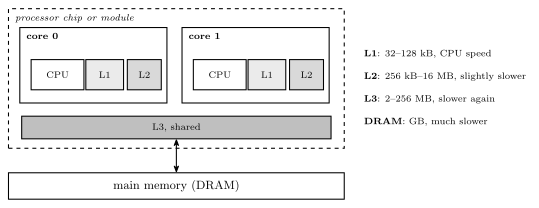
Figure 3: Three levels of cache between the CPU core and main memory. L1 sits inside the core and keeps up with it; L2 is larger and may be slightly slower; L3, on machines that have it, is larger still and usually shared by every core on the chip. A request falls through the levels in order and goes out to DRAM only if all three miss. Each level is roughly ten times the size of the one above it.
Average access time with a cache
Let the cache take \(t_c\), main memory \(t_m\), and let \(h\) be the hit rate, the fraction of accesses found in the cache. The CPU looks in the cache first, so every access pays \(t_c\), and the fraction \(1 - h\) that miss pay \(t_m\) as well:
\[t_{\text{avg}} = t_c + (1 - h)\, t_m.\]
The same thing weighted hit by miss: a hit costs \(t_c\) and a miss \(t_c + t_m\), so \(t_{\text{avg}} = h\,t_c + (1-h)(t_c + t_m)\), which expands to the line above.
If the cache and main memory are searched at the same time instead, a miss costs only \(t_m\) and \(t_{\text{avg}} = h\,t_c + (1-h)\,t_m\). The two differ by \(h\,t_c\), which is small whenever \(t_c \ll t_m\); the first form is used below.
Worked: how much a cache saves
A cache answers in 10 ns and main memory in 1 µs. What is the average access time with no cache, and with a cache whose hit rate is 90 %, 95 % and 99 %?
No cache. Every access goes to main memory: 1000 ns.
With the cache, \(t_{\text{avg}} = 10 + (1 - h) \times 1000\) ns:
| Hit rate \(h\) | Misses | \(t_{\text{avg}}\) | Faster than no cache by |
|---|---|---|---|
| 90 % | 1 in 10 | \(10 + 0.10 \times 1000 = \mathbf{110}\) ns | 9.1 times |
| 95 % | 1 in 20 | \(10 + 0.05 \times 1000 = \mathbf{60}\) ns | 16.7 times |
| 99 % | 1 in 100 | \(10 + 0.01 \times 1000 = \mathbf{20}\) ns | 50 times |
Two things to notice. The misses dominate: at 95 % the cache contributes 10 ns and the misses 50 ns. And every extra per cent of hit rate near the top is worth a lot, which is why caches are made as large as cost allows and stacked in levels. For the loop above, reading i a thousand times with one miss gives \(h = 0.999\) and \(t_{\text{avg}} = 10 + 0.001 \times 1000 = 11\) ns, close to the speed of the cache itself.
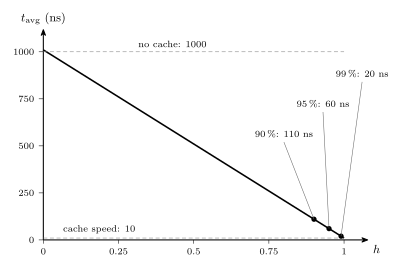
Figure 4: Average access time against hit rate, for a 10 ns cache in front of a 1 µs main memory. With no hits every access costs the full microsecond plus the wasted look in the cache; as the hit rate rises the average falls in a straight line towards the cache’s own 10 ns. The marked points are the worked hit rates: 90, 95 and 99 per cent give 110, 60 and 20 ns. Most of the benefit arrives only at high hit rates, where the line approaches the cache speed.
Common mistakes
- Reading the hierarchy as “faster is better, so use only the top”. The top is fast precisely because it is small and expensive. The hierarchy exists because no level can do every job.
- Forgetting the lookup cost on a miss. With a look-in-the-cache-first design, a miss costs \(t_c + t_m\), not \(t_m\).
- Weighting by the wrong fraction. \(1 - h\) multiplies the main-memory time; a 95 % hit rate means 5 % of accesses go to main memory.
- Mixing B and b. Cache sizes are in bytes: 32 kB of L1 is 256 kibibits.
- Thinking a cache adds capacity. A cache holds copies of words that are also in main memory. It makes memory faster, not larger.
See also
- memory-technologies — SRAM, DRAM and the rest of the memories at each level
- magnetic-disks — the disk level, and why its access time is in milliseconds
- file-systems — how the bottom levels are organised into files
- cpu-organisation · fetch-decode-execute-cycle — the CPU at the top of the hierarchy and how often it reaches into memory
- avr-architecture — a machine with no cache: the AVR’s SRAM already runs at CPU speed
- 2026-10-22-memory-disks-and-files — Lecture 24