Magnetic Disks
How a hard disk drive stores data and why reaching it takes milliseconds. This note covers platters, surfaces, heads, tracks, sectors and cylinders; what a sector holds besides data, and how much of a disk is left for files; and the access time of a disk, the sum of the seek time, the rotational latency and the transfer time, with the average worked out for a 7200 rpm disk. Where disks sit among the other memories is in memory-hierarchy-and-cache, and how files are laid out on sectors is in file-systems. First met in 2026-10-22-memory-disks-and-files.
How a hard disk stores data
A hard disk drive (HDD) is a stack of rotating platters, each with a magnetised coating on both faces. A bit is stored as the direction in which a tiny patch of the coating is magnetised: one direction for 1, the other for 0, north pole up or south pole up.
- The platters spin together on one spindle, continuously, at a fixed speed: 5400, 7200 or 10,000 revolutions per minute are common.
- Data is written in concentric circles called tracks.
- A read/write head for each surface floats above it on a cushion of air dragged along by the spinning platter, a few nanometres (of the order of 5 nm) off the surface. It never touches the surface in normal running; if it does, the result is a head crash.
- Both sides of each platter are usually used, so a disk with \(p\) platters has \(2p\) surfaces and \(2p\) heads.
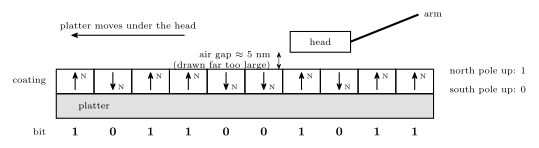
Figure 1: A cross-section along one track, nowhere near to scale. The magnetised coating is divided into tiny patches, and each stores one bit as the direction it is magnetised: north pole up for a 1, south pole up for a 0. The head flies on a cushion of air about 5 nm above the surface and never touches it. As the platter carries the patches past, the head reads each bit by sensing the direction of its field, or writes one by setting it. The underside of the platter has its own coating and its own head; only the top is drawn.
All the heads are mounted on one arm assembly and move in and out together. Only one head reads or writes at a time.
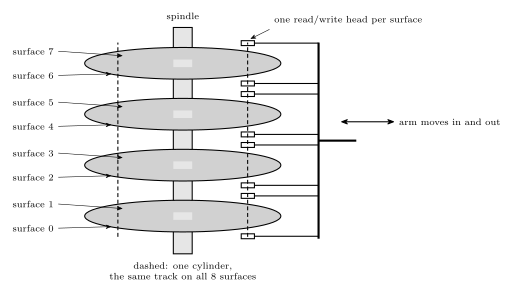
Figure 2: A disk with four platters seen from the side. Each platter has two recording surfaces, so there are eight, numbered 0 to 7 from the bottom, and one read/write head for each. The heads are all on one comb-shaped arm, so they move in and out together: when one head is over a track, every other head is over the track at the same radius on its own surface. Those eight tracks, outlined by the dashed cylinder, form one cylinder.
Tracks, sectors and cylinders
- A track is one circle of data on one surface, at one radius.
- Each track is divided into fixed-length sectors. A sector is the smallest unit of data: the disk always reads or writes a whole sector at a time, typically 512 bytes (4096 on newer disks).
- A cylinder is the set of tracks at a given radial position, one on each surface.
Cylinders
Because the heads move together, they are always positioned over a whole cylinder. Assuming both sides of every platter are used,
\[\text{tracks per cylinder} = 2 \times \text{number of platters}.\]
The four-platter disk above has \(2 \times 4 = 8\) tracks in each cylinder. Data the disk will need together is best placed in one cylinder: switching between its tracks only means switching heads, electronically, with no arm movement at all.
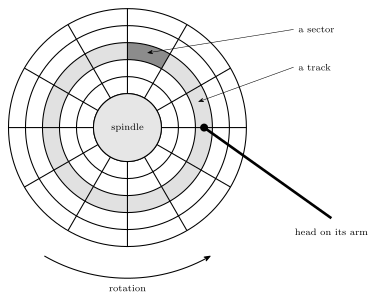
Figure 3: One surface seen from above. The tracks are concentric circles, and each is divided into sectors, here twelve to a track, which are the smallest units the disk reads or writes. The highlighted ring is one track and the dark patch one sector of it. The head sits on its arm over one track at a time, here the highlighted one; the platter turns beneath it, carrying each sector of that track past in turn. The same track on every surface makes up a cylinder.
What a sector holds
A sector is more than its data. Along the track it is laid out as:
- Preamble: a known pattern that lets the head synchronise to the data, finding where the sector starts and the timing of its bits.
- Data: the sector’s payload, typically 512 bytes.
- Error correction code (ECC): extra bits computed from the data that let small read errors be detected and corrected.
- Inter-sector gap: blank space before the next sector’s preamble, a margin for the head and for small speed variations.
The layout follows the same idea as a UART frame (serial-communication): there is no separate clock on the wire or the platter, so something has to announce the start and fix the timing (the start bit; the preamble), the data follows, some redundancy checks it (the parity bit; the much stronger ECC), and a guaranteed idle stretch separates one unit from the next (the stop bits; the gap).
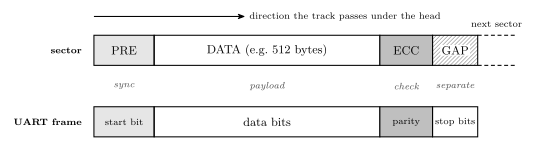
Figure 4: The format of a sector along a track, with a UART frame beneath it for comparison. The preamble lets the head lock on to the timing, the data is the payload, the error-correcting code lets damaged bits be repaired, and the gap separates this sector from the next. A UART frame solves the same problem of sending self-timed data with no clock line, with a start bit, data bits, a parity bit and stop bits; the sector’s ECC is far stronger than parity, which can only detect a single flipped bit.
How much of a disk holds data
The preambles, ECCs and gaps take space on every sector, and the file system’s own tables take more:
- about 85 % of the raw disk capacity is usable by the operating system; the rest is sector overhead;
- about 95 % of that is usable for user data; the remaining ~5 % is file-system overhead (file-systems).
So user data gets about \(0.85 \times 0.95 = 0.8075\), roughly 81 % of the raw capacity, and the file system takes \(0.85 \times 0.05 = 4.25\,\%\) of it.
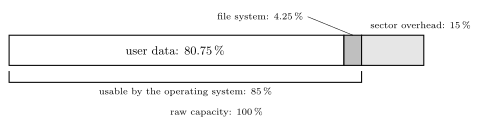
Figure 5: Where a disk’s raw capacity goes. About 15 per cent is spent on each sector’s preamble, error-correcting code and gap, leaving 85 per cent that the operating system can use. The file system’s tables take about 5 per cent of that, 4.25 per cent of the raw capacity, leaving roughly 81 per cent for the files themselves.
Access time
Reading a sector takes three steps, one after another, so
\[\text{access time} = \text{seek time} + \text{rotational latency} + \text{transfer time}.\]
- Seek time: the time to move the heads to the right cylinder. It depends on how far the arm has to travel.
- Rotational latency: the time spent waiting for the sector to arrive under the head, once the head is on the right track. It depends on where the sector happened to be when the head arrived.
- Transfer time: the time for the sector to pass under the head while it is read. One sector is a small fraction of a track, so this is negligible compared with the other two.
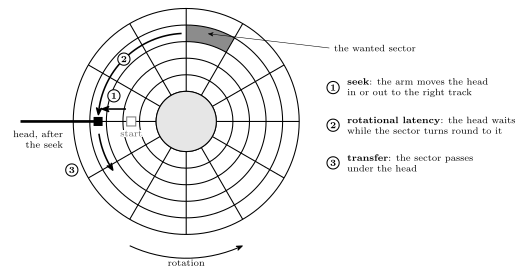
Figure 6: Where the three parts of an access come from, on one surface. The head starts over the wrong track. First the arm moves it in or out to the track that holds the wanted sector (1, the seek). The head is then over the right track, but the sector is somewhere else on the circle, so the head waits while the platter turns the sector round to it (2, the rotational latency): anything from no time to a whole turn, half a turn on average. Then the sector passes under the head as it is read (3, the transfer), a small fraction of a turn. The seek is a movement of the arm and the latency a movement of the platter, and the second cannot start being useful until the first has finished, so the times add.
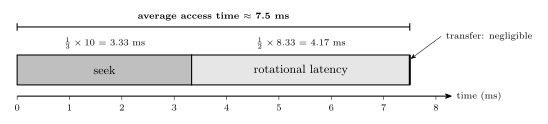
Figure 7: The three parts of a disk access in time order, drawn to scale for the average access of a 7200 rpm disk with a 10 ms edge-to-edge seek. First the arm moves to the right cylinder, 3.33 ms on average; then the head waits for the sector to come round, half a rotation, 4.17 ms on average; then the sector passes under the head, which takes only microseconds and is too thin to see at this scale. Both of the large parts are mechanical, which is why a disk is thousands of times slower than main memory.
Average rotational latency
Let \(T\) be the time for one rotation. When the head arrives on the track, the wanted sector may be just arriving (wait 0) or may have just gone past (wait almost \(T\)), and every position in between is equally likely. The average of a wait spread evenly between 0 and \(T\) is the midpoint,
\[\text{average rotational latency} = \frac{T + 0}{2} = \frac{T}{2},\]
half a rotation.
Average seek time
The edge-to-edge seek time is the time to move from the outermost cylinder to the innermost, the longest possible seek. If seek time is proportional to the number of tracks crossed, the average seek depends on the average distance between where the heads are and where they need to go.
Measure positions as a fraction of the way across the disk, from 0 at one edge to 1 at the other. Take the starting position \(x\) and the target \(y\) as independent and both uniformly random. The distance is \(|x - y|\), and its average is
\[\int_0^1\!\!\int_0^1 |x - y|\,dx\,dy = 2\int_0^1\!\!\int_0^x (x - y)\,dy\,dx = 2\int_0^1 \frac{x^2}{2}\,dx = \frac13.\]
The factor 2 is the symmetry: the region \(y > x\) contributes the same as \(y < x\). So
\[\text{average seek time} = \frac13 \times \text{edge-to-edge seek time}.\]
It is not one half. Half would be right if the heads always started at one edge, but the start is random too. Two random points on a line are on average a third of its length apart: short seeks are much commoner than long ones, because a long seek needs both ends near opposite edges.
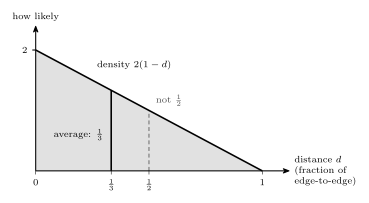
Figure 8: Why the average seek is a third of the edge-to-edge seek. If the start and the target are independent and each uniform across the disk, the distance d between them has density 2(1 - d): short seeks are common and a full edge-to-edge seek is rare, because it needs both ends at opposite edges. The balance point of that triangle is at d = 1/3, not 1/2. One half would be the average only if every seek began at an edge.
Worked: average access time of a 7200 rpm disk
What is the average access time for a hard disk which rotates at 7200 rpm and has an edge-to-edge seek time of 10 ms? Assume that seek time is proportional to the number of tracks to seek.
The rotation period. \(7200\) revolutions per minute is
\[\frac{7200}{60} = 120 \text{ revolutions per second}, \qquad T = \frac{1}{120}\text{ s} = \frac{1000}{120}\text{ ms} = 8.33\text{ ms}.\]
Average seek. Seek time is proportional to distance, so the average seek is a third of the edge-to-edge time: \(\frac13 \times 10 = 3.33\) ms.
Average rotational latency. Half a rotation: \(\frac12 \times 8.33 = 4.17\) ms.
Transfer time. Negligible. As a check, if a track held 1000 sectors, one sector would pass in \(8.33\text{ ms} / 1000 = 8.3\ \mu\)s, under 0.2 % of the total.
Total.
\[\text{average access time} = \frac13(10\text{ ms}) + \frac12\left(\frac{1000}{120}\text{ ms}\right) + \text{negligible} = 3.33 + 4.17 = \mathbf{7.5\ ms}.\]
The convention matters. Taking the average seek as half the edge-to-edge time would give \(5 + 4.17 = 9.17\) ms. These notes use one third, because the question says seek time is proportional to the tracks crossed and both the start and the target position are random, and for that the average distance is exactly a third of the way across (Figure 8). Half is the average only for seeks that start from one edge.
A faster disk. At 10,000 rpm, \(T = 60/10{,}000\) s \(= 6\) ms, the average latency is 3 ms, and with the same seek the average access time is \(3.33 + 3 = 6.33\) ms. Spinning faster only shortens the latency; the seek is the arm’s job.
Common mistakes
- Using the full rotation as the latency. On average the sector is half a turn away: \(T/2\), not \(T\).
- Using half the edge-to-edge seek as the average. With random start and end positions the average distance is a third of the way across, so the average seek is a third of the edge-to-edge time.
- Forgetting to convert rpm. Divide by 60 for revolutions per second, then invert for the period, then multiply by 1000 for milliseconds: 7200 rpm is 8.33 ms per turn.
- Counting a cylinder’s tracks as the number of platters. Each platter has two surfaces, so a cylinder has \(2 \times\) platters tracks.
- Thinking a disk can read part of a sector. The sector is the smallest unit read or written; changing one byte means rewriting the whole sector.
- Taking the raw capacity as space for files. About 85 % is usable by the operating system, and about 95 % of that by files.
See also
- memory-hierarchy-and-cache — disks among the other levels of memory
- file-systems — how sectors are grouped into blocks and files, and why fragmentation hurts the access time
- memory-technologies — SSDs, the flash-based alternative with no moving parts
- serial-communication — the UART frame, the same start, data, check and stop idea
- 2026-10-22-memory-disks-and-files — Lecture 24