File Systems
How an operating system turns a disk full of numbered sectors into named files. This note covers the file as the common I/O abstraction, what a file system does and the tables it keeps, low-level and high-level formatting, why deleting a file does not erase it, allocation in blocks and the trade-off in choosing a block size, and contiguous against fragmented allocation. The sectors, tracks and cylinders underneath are in magnetic-disks. First met in 2026-10-22-memory-disks-and-files.
The file: a sequence of bytes
Nobody writing a program wants to deal with drive unit numbers, heads, cylinders and sectors, or with timeout errors and retries when a read fails. The operating system hides all of that behind one abstraction, the file.
To the operating system, a file is just a sequence of bytes. It can be read from, written to and extended, and it has a current position where the next read or write happens. Any structure inside it is up to the application program: a C source file is lines of text, an image file has a header and pixel data, but the OS sees bytes in both cases. The same read and write work on all of them.
What a file system does
Computers are far easier to use, and to program, when files have names: FinalReport.doc rather than “cylinder 412, head 3, sectors 17 to 40”. A file system provides this. It associates files, which are collections of sectors, with names and directories.
To do that it divides the disk’s sectors into two kinds:
- index sectors, holding the file system’s own tables: which names exist, in which directories, and which sectors belong to each file. The File Allocation Table (FAT) of the FAT file systems is one such table;
- data sectors, which store the files themselves.
The OS maintains a map from each file name to a set of blocks (below), and each block to its sectors. To help users, names are organised in a hierarchy of directories, or folders.
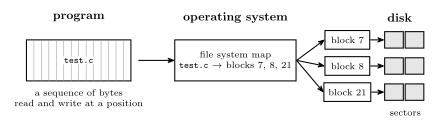
Figure 1: The layers between a program and the disk. The program reads and writes a file as a single sequence of bytes, at a current position. The operating system’s file system keeps a map from the file’s name to the blocks that hold it, and each block is one or more consecutive sectors on the disk. Neither the blocks nor the sectors need be next to one another: the map is what makes a scattered set of sectors look like one file.
There are many file systems, which differ in how they lay out their tables and what they record: FAT, FAT32, exFAT (memory cards, USB sticks), NTFS (Windows), EXT2, EXT3, EXT4 (Linux), APFS, HFS+ (macOS), UFS (BSD Unix), ZFS, and more.
Formatting
Formatting comes at two levels.
| Low-level format | High-level format | |
|---|---|---|
| What it does | reinitialises every sector: writes each one’s preamble, empty data and ECC | creates an empty file system |
| What it writes | the whole disk | only the index (table) sectors |
| File system afterwards | none | an empty one |
| Old data afterwards | gone | still in the data sectors, unreferenced |
A low-level format lays out the sector structure of magnetic-disks, so it touches every sector and takes a long time. A high-level format, what an operating system does when it is asked to “format” a disk, only writes fresh, empty tables, so it is quick, and it leaves the old files’ bytes where they were.
Deleting does not erase
Deleting a file does not mean it is gone. To delete a file, the OS may just delete its index entry and mark its blocks as free. It does not overwrite the sectors where the data is stored: that would cost a write to every sector for no benefit to the user.
The bytes stay on the disk until new files happen to be given those blocks and overwrite them. That is how undelete and data-recovery tools work, and why a disk being given away should be overwritten, not just emptied or quickly formatted.
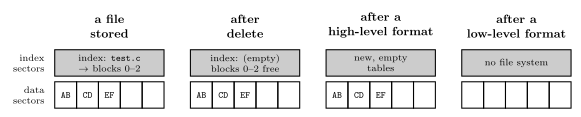
Figure 2: What deleting a file and the two kinds of format each change. The disk has index sectors, holding the file system’s tables, and data sectors, holding the files. Deleting a file removes its entry from the index and frees its blocks, but its bytes stay in the data sectors until something else is written there. A high-level format writes fresh, empty tables and leaves the data sectors alone. Only a low-level format rewrites every sector.
Blocks
File storage is allocated in blocks, also called allocation units or clusters. A block can be as small as one sector, or several consecutive sectors. Typical block sizes run from 512 bytes to 32 kB.
A file always occupies a whole number of blocks. The last block is usually only partly filled, and the rest of it is wasted: no other file can use it. So the choice of block size is a trade-off.
- Larger blocks mean fewer blocks per file, so a smaller map from names to blocks, and less work to find and read a file’s blocks; but more wasted space at the end of each file (at the EOF, end of file).
- Smaller blocks waste less at the end of each file, but the map is larger and a file is split into more pieces.
On average, a file wastes half a block. A file’s length is very unlikely to be an exact number of blocks. If the amount it spills into its last block is equally likely to be anything from nothing to a whole block, the unused part of that block is, on average,
\[\text{wasted space per file} \approx \tfrac12 \times \text{block size}.\]
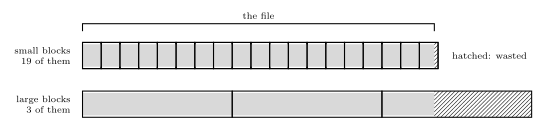
Figure 3: One file stored with small blocks and with large ones. The file’s bytes fill whole blocks until the last, which is only partly used; the rest of that block, hatched, is wasted, because no other file can use it. With small blocks the waste is small but the file needs many blocks and the map must list them all. With large blocks the map is short but the waste can approach a whole block. On average the waste is half a block per file.
Worked: choosing a block size
A 10,000-byte source file is stored on a disk formatted with 512-byte, 4 kB or 32 kB blocks (kB here meaning 1024 bytes). For each block size, how many blocks does the file take, how much space is wasted at its end, and how many blocks must the map track for a 1 GiB volume? On a disk of 10,000 files, how much space is wasted on average?
Blocks for the file is the file size divided by the block size, rounded up: a file cannot use part of a block.
| Block size | Blocks | Space taken | Wasted at the end | Waste as share of the space taken |
|---|---|---|---|---|
| 512 B | \(\lceil 10000/512 \rceil = 20\) | 10,240 B | 240 B | 2.3 % |
| 4 kB = 4096 B | \(\lceil 10000/4096 \rceil = 3\) | 12,288 B | 2,288 B | 18.6 % |
| 32 kB = 32,768 B | \(\lceil 10000/32768 \rceil = 1\) | 32,768 B | 22,768 B | 69.5 % |
Map size. A 1 GiB volume is \(2^{30}\) bytes, so it has \(2^{30}/512 = 2{,}097{,}152\) blocks of 512 B, \(2^{30}/4096 = 262{,}144\) blocks of 4 kB, and \(2^{30}/32768 = 32{,}768\) blocks of 32 kB. The map must track every one of them, so the largest blocks give a map 64 times smaller than the smallest.
Waste across the disk. At half a block per file, 10,000 files waste about
| Block size | Average waste per file | For 10,000 files |
|---|---|---|
| 512 B | 256 B | 2,560,000 B \(\approx\) 2.44 MiB |
| 4 kB | 2 kB | 20,480,000 B \(\approx\) 19.53 MiB |
| 32 kB | 16 kB | 163,840,000 B \(\approx\) 156.25 MiB |
So small blocks suit a disk of many small files, where large blocks would waste much of the space. Large blocks suit a disk of a few large files, where half a block per file is nothing and the short map and fewer pieces per file pay off.
Contiguous and fragmented allocation
Where a file’s blocks are placed on the disk decides how fast it can be read.
- Contiguous allocation puts the blocks one after another along a track, then on the next track of the same or the adjacent cylinder. Reading the file costs one seek and one rotational wait to reach its first block, after which the sectors stream past the head in order. Moving on to the next track costs only a step to the adjacent track (or none at all, if it is another surface of the same cylinder, which is just a switch of head) and a wait for the next block to come round.
- Fragmented allocation scatters the blocks over different tracks and sectors. Every jump to a different track costs a seek, and every jump to a sector that is not the next one along costs rotational latency (magnetic-disks).
Contiguous allocation is ideal, but over time it becomes unlikely: as files are created, grown and deleted, the free space breaks up into small scattered pieces, and a new file has to be put in whatever pieces are free. The disk becomes fragmented, and fragmentation makes access slow. Defragmenting moves each file’s blocks back together. (An SSD has no seek or rotation, so fragmentation costs it far less.)
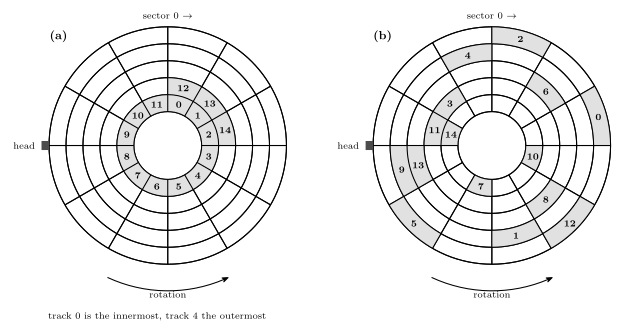
Figure 4: Two ways the same 15-block file can be stored, one block to a sector, on a surface with five tracks of twelve sectors. Sectors are numbered clockwise from the top and the disk turns so that they pass the head in that order. In (a) the blocks are contiguous: 0 to 11 fill one track in order and 12 to 14 continue on the next. One seek and one wait reach block 0, a single turn reads blocks 0 to 11, and then the head steps out to the adjacent track and waits for block 12 to come round before reading the last three. In (b) the disk is fragmented and the blocks are scattered over every track, so reading them in order needs a seek almost every time and a wait for the next block to come round.
Common mistakes
- Thinking delete or a quick format erases data. Both rewrite only the index; the bytes remain until overwritten.
- Rounding the block count down. A 10,000-byte file in 4096-byte blocks needs 3 blocks, not 2: \(\lceil 10000/4096 \rceil = 3\).
- Assuming bigger blocks are always better. They shrink the map but waste half a block per file on average, which adds up on a disk of small files.
- Confusing a block with a sector. The sector is the disk’s unit; the block is the file system’s, one or more consecutive sectors.
- Thinking the OS sees structure in a file. To the OS a file is bytes. Lines, records and headers are the application’s business.
See also
- magnetic-disks — tracks, sectors, cylinders and the access time that fragmentation inflates
- memory-hierarchy-and-cache — the disk level of the hierarchy
- memory-technologies — flash and SSDs, and the units disk sizes are quoted in
- 2026-10-22-memory-disks-and-files — Lecture 24