Software Timers
Keeping time for many things with one hardware timer. One timer interrupt counts ticks since reset, and every part of the program that cares about time reads that count. The stopwatch of week9-lab-avr-interrupts is its simplest relative. It replaces the delay macros of week9-lab-avr-pwm.
Delays that block
The quickest way to make a program wait is a delay macro:
#define F_CPU 8000000UL        /* the clock frequency, before the include */
#include <util/delay.h>

_delay_ms(500);                /* do nothing for 500 ms */
_delay_us(20); /* do nothing for 20 microseconds */F_CPUmust be defined before the include. The macros turn a time into a number of wasted instructions, and they need the clock frequency to do it. If it is missing the header only warns and assumes 1 MHz, so on an 8 MHz board every delay runs 8 times too short.- The argument must be a constant, known when the program is compiled.
This is busy waiting. The processor spends the whole delay counting down in a loop, and while it does:
- no button is read and no input is noticed, so a press shorter than the delay is missed;
- nothing else is updated, so a multiplexed display freezes on one digit;
- only one delay can be running, so two things with different periods cannot both be timed this way;
- the loop’s real period is the delay plus however long the rest of the loop takes, so the timing drifts.
Interrupts still happen during a delay, which makes it longer than asked for.
A delay macro is fine for a quick experiment. It does not scale to a program that has more than one thing to do.
One clock for the whole program
The ATmega324A has three timer/counters (avr-timers-and-counters). A program with more than three timed jobs would run out if each took one, and usually some are already taken for PWM or for counting.
A software timer uses one of them for everything:
- One timer/counter raises an interrupt at a fixed interval, the tick.
- The handler adds 1 to a global count. That count is the time since reset, the program’s clock.
- To mark the moment something happens, copy the count into a variable.
- To measure a duration, subtract two such copies. The answer is in ticks, so with a 1 ms tick it is in milliseconds.
- To do something later or regularly, keep checking whether enough ticks have passed, and get on with other things in between.
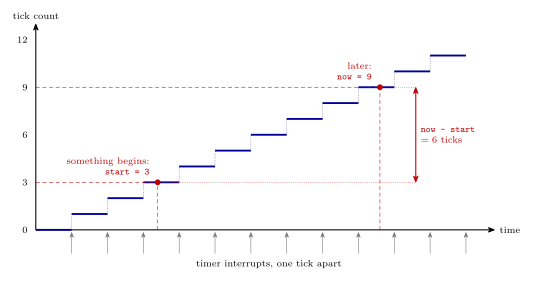
Figure 1: A software timer. The tick count goes up by one at every timer interrupt and never stops. Copying it when something begins gives start, here 3, and reading it again later gives now, here 9. The difference is the time between them in ticks. Any number of start values can be kept at once, which is how a single hardware timer serves every timing job in the program.
The clock in C
A 1 ms tick from timer/counter 0. With the 8 MHz clock divided by 64 the timer counts at 125 kHz, and clearing on a compare match at 124 gives \(8\,000\,000 / (64 \times 125) = 1000\) matches a second.
#include <avr/io.h>
#include <avr/interrupt.h>

volatile uint32_t clock_ticks;            /* milliseconds since reset */

ISR(TIMER0_COMPA_vect) {
    clock_ticks++;
}

void init_clock(void) {
    OCR0A  = 124;                         /* 125 counts per tick           */
    TCCR0A = (1<<WGM01);                  /* clear on compare match (CTC)  */
    TCCR0B = (1<<CS01) | (1<<CS00);       /* clock / 64                    */
    TIMSK0 = (1<<OCIE0A);                 /* enable the interrupt          */
    TIFR0  = (1<<OCF0A);                  /* clear its flag by writing 1   */
}
The handler is as short as a handler can be. The count is volatile because it changes outside the main program’s control (avr-interrupts).
Reading the count safely
The count is 32 bits and the processor is 8-bit, so reading it takes four instructions, one byte each. If the tick interrupt arrives between them, the bytes come from two different values. Going from 0x000000FF to 0x00000100, a read that is interrupted halfway can come out as 0x000001FF or as 0x00000000. Both are wrong by hundreds of ticks.
The cure is to turn interrupts off for the few instructions of the read:
uint32_t get_time(void) {
    uint32_t t;
    uint8_t sreg = SREG;       /* remember whether interrupts were on  */
    cli();                     /* nothing can change the count now     */
    t = clock_ticks;
    SREG = sreg;               /* put the I bit back as it was         */
    return t;
}
Saving SREG and putting it back, instead of calling sei(), means the function is safe to call from anywhere, including from code where interrupts are meant to be off.
The same applies to writing a shared variable of more than one byte from the main program. A single-byte variable needs none of this for a plain read or a plain write, since one instruction does all of it. Changing one in place is different: x++ or flags |= 1 in the main program reads, changes and writes back in separate instructions, and a handler that writes the same variable in between has its change lost. Inside a handler interrupts are already off.
Doing several things at once
With a clock to read, the main loop never waits. On each pass it checks which jobs are due:
void refresh_display(void);                   /* written elsewhere */
void check_buttons(void);

int main(void) {
    uint32_t now, last_blink = 0, last_refresh = 0;

    DDRB |= (1<<0);
    init_clock();
    sei();

    while (1) {
        now = get_time();

        if (now - last_blink >= 500) {        /* every half second */
            last_blink = now;
            PORTB ^= (1<<0);                  /* toggle an LED */
        }

        if (now - last_refresh >= 5) {        /* every 5 ms */
            last_refresh = now;
            refresh_display();                /* show the other digit */
        }

        check_buttons();                      /* every pass: nothing is missed */
    }
}
Each job has its own “last time” variable and its own interval. Adding a job means adding a variable and an if, and no more hardware.
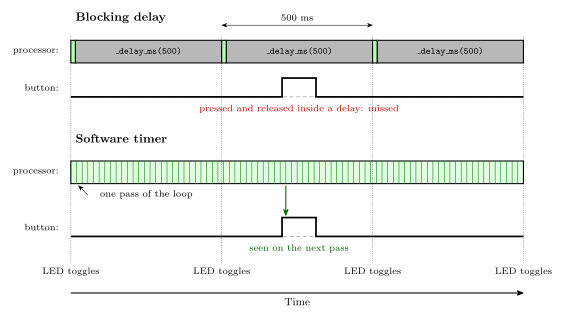
Figure 2: The same job, blinking an LED every half second while also watching a button, written two ways. With a blocking delay the processor is stuck inside the delay almost all the time, and a button press that comes and goes during it is never seen. With a software timer the loop goes round thousands of times a second, looking at the clock and the button on every pass, so the press is caught straight away and the LED still toggles on time.
Measuring a duration
To find how long something took, note the time at the start and subtract at the end:
uint32_t start, held;

start = get_time();                 /* the button went down */
/* ... carry on with the main loop until it comes up ... */
held = get_time() - start;          /* how long it was held, in ms */
A stopwatch that is started once and read later is exactly this. One that can be stopped and restarted keeps a count of its own instead, advanced by the tick handler only while it is running, which is how the stopwatch of week9-lab-avr-interrupts works.
Limits
Resolution. Nothing can be timed more finely than one tick. A duration measured with a 1 ms tick can be out by up to 1 ms, depending on where in a tick it began and ended. A shorter tick is more precise, but the handler runs more often and takes more of the processor’s time.
Wrap-around. The count has a fixed number of bits and eventually goes back to 0.
| Count | Tick | Wraps after |
|---|---|---|
| 16 bits | 10 ms | 655 s, about 11 minutes |
| 16 bits | 1 ms | 65.5 s |
| 32 bits | 1 ms | about 49.7 days |
Unsigned subtraction still gives the right answer across a wrap, as long as the real interval is shorter than one whole trip round. If start was 0xFFFFFFFA and the count is now 0x00000004, then now - start is 10, which is correct. This is why the test is written
if (now - last >= INTERVAL) /* right, even across a wrap */and not
if (now >= last + INTERVAL) /* wrong when last + INTERVAL wraps */This relies on the count being 16 or 32 bits wide. With an 8-bit count C does the subtraction as an int, the wrap is lost, and the result needs a cast: (uint8_t)(now - last).
Common mistakes
- Waiting in a loop for the time to pass.
while (get_time() - start < 500) { }is busy waiting again, only with a better clock. The check belongs in anifinside the main loop, so that everything else keeps running. - Reading a multi-byte count with interrupts on. It works nearly every time and then, rarely, gives a wildly wrong value.
- Forgetting
volatile. The compiler may then read the count once and never look again. - Doing slow work in the tick handler. The handler counts, and may do something quick such as lighting the next display digit. Anything that takes time belongs in the main loop, which decides what is due and does it.
- Comparing with
>=on the sum. Compare the difference with the interval, as above. - Expecting exact intervals. A job runs on the first pass of the loop after it falls due. If another job is slow, this one is late.
See also
- week9-lab-avr-interrupts — Lab 14: a stopwatch on a 10 ms tick
- week9-lab-avr-pwm — Lab 13: where the delay macros are used
- avr-interrupts — handlers in C,
volatile, the I bit - avr-timers-and-counters — CTC mode and the master formula
- polling-and-interrupts — the same trade-off for inputs
- seven-segment-display — display multiplexing, a job that needs regular timing