INFS1200 — Week 12 Notes
Database Security
Module 5 — the final module. Covers threats to database security, the control measures used to defend against them, and SQL injection.
Outline
- Threats to database security
- Access control mechanisms — discretionary, mandatory, role-based
- Other control measures — inference control, flow control, encryption
- SQL injection
Why database security matters
Some of the largest data breaches on record (Yahoo, First American, Facebook, Marriott, MongoDB, Equifax, and others) collectively exposed billions of records — via hacking, poor security practice, or simple misconfiguration. Database security matters for:
- Legal/policy reasons — e.g. government policy protecting access to individuals’ data (medical records, financial ratings).
- Ethical reasons — e.g. controlling who can see employee salary packages or student grades.
- Technical reasons — e.g. protection from malware, performance overloading.
Threats — the CIA principle
- Loss of confidentiality — unauthorized disclosure of confidential information.
- Loss of integrity — improper modification of information.
- Loss of availability — a legitimate user cannot access data objects.
Privacy vs. security
- Security concerns how access to data is controlled — availability for use (with integrity) and permitted access.
- Privacy concerns how data can be used — an individual’s ability to control the terms under which their sensitive data is acquired and used (preventing storage of sensitive data; ensuring appropriate/authorized use of it).
- Security is a required building block for privacy, but they’re distinct: privacy concerns both directly accessible information and information that can be inferred from accessible data.
Sensitive data is often double-edged — patient data is private, but also valuable for biomedical/public-health research; audio from CCTV can capture private conversations, but also evidence of criminal activity. This creates a utility/privacy tradeoff: protect all sensitive data, while making as much nonsensitive data available as possible.
Database control measures
Four broad categories:
- Access control — provide access only to users with the right access authority.
- Inference control — ensure information about individuals cannot be derived even indirectly (applies to statistical databases).
- Flow control — prevent information from flowing to unauthorized users.
- Data encryption — protect sensitive data in transit.
Access control mechanisms
Database access control has two components:
- Authentication — verifying the identity of whoever is accessing the database.
- Authorization — determining whether an authenticated user should be allowed to execute the transaction they’re attempting.
Basic authentication security functions
- User accounts — users log in with an assigned username/password.
- Login session — a sequence of database operations by one user, recorded in the system log (also used for recovery, not just security).
- Database audit — reviewing the log to examine all accesses and operations applied during a period, to identify potential privacy breaches or unauthorised modifications. A log typically records who ran what operation, when, and (for modifications) the before/after values.
Discretionary Access Control (DAC)
Based on granting and revoking privileges.
CREATE USER <username> IDENTIFIED BY "<password>";

GRANT privilegeName
ON     objectName
TO     {userName | PUBLIC | roleName}
[WITH GRANT OPTION];

REVOKE privilegeName
ON     objectName
FROM   {userName | PUBLIC | roleName};
Two levels of privileges
- Account level — privileges specified per account, independent of any particular relation:
CREATE SCHEMA/TABLE/VIEW,ALTER/DROP TABLE, modification (INSERT/DELETE/UPDATE) andSELECTprivileges. - Relation level — privileges for a specific relation or view (can also be specified at the attribute level): select (read), modification (insert/delete/update), and references privileges. The
REFERENCESprivilege grants permission to create a foreign key reference to the specified table.
Three concrete forms of the above, all of which week12-tutorial-5-1-database-security needs in order to repair a misconfigured set of accounts:
-- everything the account holds on that object, in one statement
REVOKE ALL PRIVILEGES ON `schema`.`Table` FROM 'user';

-- the ability to delegate, revoked separately from the privilege itself
REVOKE GRANT OPTION ON `schema`.`Table` FROM 'user';

-- attribute level: the column list goes on the privilege, not the object
GRANT SELECT (`fName`, `lName`) ON `schema`.`Table` TO 'user';
Note there is no statement for narrowing a privilege: downgrading an account from ALL PRIVILEGES to SELECT is always REVOKE ALL PRIVILEGES followed by GRANT SELECT. Backticks quote identifiers that contain spaces or apostrophes, and objects are named `schema`.`table`.
CREATE SCHEMA AUTHORIZATION oe
    CREATE TABLE Product (color VARCHAR2(10) PRIMARY KEY, quantity NUMBER)
    CREATE VIEW RedProduct AS
        SELECT color, quantity FROM Product WHERE color = 'RED'
    GRANT select ON RedProduct TO hr;
This single statement creates a schema oe, creates Product, creates the view RedProduct, and grants hr the SELECT privilege on RedProduct.
Access matrix model
Each relation R is assigned an owner account. Owners can grant select/modification/references privileges to other users on any owned relation. An access matrix M(i, j) captures the privilege(s) user i has on object j:
| Jake | Aiden | Nelly | Sham | |
|---|---|---|---|---|
| Customer | READ | READ | MODIFY | — |
| CustOrder | — | — | READ | — |
| CustOrder.amt | — | READ | READ | — |
| Supp.status | — | READ | MODIFY | REFERENCE |
| Supp.address | — | READ | MODIFY | MODIFY |
Revoking and propagating privileges
REVOKE cancels a privilege — useful for granting something temporarily. If account A grants a privilege to B WITH GRANT OPTION, B can then grant it onward to other accounts, without A’s direct knowledge — the DBMS must track this chain of dependency to support revocation correctly.
REVOKE privilegeName ON objectName FROM userName [RESTRICT | CASCADE];CASCADE— revokes the privilege and any dependent privileges that were granted as a result of it (following the chain onward).RESTRICT— refuses the revoke (returns an error) if the privilege has already been passed on to someone else.
A user’s authorization is valid iff there is a path from the root of the authorization graph down to that user’s node. So if u1 grants to u2, who grants to u3: revoking u1 → u2 also cuts off u3 (no path remains); but revoking a different branch, or u2’s authorization being revoked by someone else entirely, doesn’t necessarily touch u1 (the grantor’s own authorization is independent of what they’ve granted downstream).
Specifying privileges through views
If owner A wants to give account B a limited capability to SELECT from a relation — e.g. only some columns, or only rows meeting a condition — A can create a view and grant access to the view instead of the base table:
-- Employee [ssn, name, dob, address, sex, salary, mgrSSN, dNum]
CREATE VIEW A3EMPLOYEE AS
    SELECT name, dob, address
    FROM   EMPLOYEE
    WHERE  dNum = 5;

GRANT SELECT ON A3EMPLOYEE TO A3;
A3 can now only ever see name/dob/address for department 5 employees — never salary, ssn, or other departments’ staff.
Question 1 — Discretionary access control
Which statement removes a privilege from a user?
A. Remove update on department from Amir B. Revoke update on employee from Amir C. Delete select on department from Raj D. Grant update on employee from Amir
B. REVOKE is the actual SQL keyword for removing a privilege. REMOVE and DELETE aren’t valid DCL keywords for this purpose, and GRANT adds a privilege rather than removing one.
Question 2 — Discretionary access control (propagation)
u1 grants authorization to u2, who in turn grants it to u3. Which is correct?
A. If u1 revokes from u3, u2’s authorization is revoked. B. If u1 revokes from u2, u3’s authorization is also revoked. C. If u2’s authorization is revoked, u1’s authorization is also automatically revoked.
B. A user has an authorization iff there’s a path from the root of the authorization graph down to their node. u1 → u2 → u3 — revoking u1’s grant to u2 removes the only path down to u3 as well, so u3 loses authorization too. Revoking from u3 directly (A) has no effect on u2’s own (separately-granted) authorization. u2 losing authorization (C) doesn’t propagate upward to u1 — u1 is the root/grantor, not a recipient.
Worked exercise — GRANT/REVOKE chains
Four users A1, A2, A3, A4. DBA: GRANT CREATETAB TO A1. A1 creates Employee and Department, then runs:
GRANT INSERT, DELETE ON Employee, Department TO A2;
GRANT SELECT ON Employee, Department TO A3 WITH GRANT OPTION;Q1: Can A3 execute GRANT SELECT ON Employee TO A4?
Yes — A3 was granted SELECT WITH GRANT OPTION, so A3 can pass that privilege on to A4.
Q2: If A1 then runs REVOKE SELECT ON Employee FROM A3, does A4 still have SELECT on Employee?
No — A4’s privilege is automatically revoked too, by propagation (there’s no longer a path from the root down to A4).
Q3: What type of access control is this?
Discretionary access control — privileges are granted/revoked at the discretion of individual account owners, rather than being fixed by a system-wide security classification (MAC) or role hierarchy (RBAC).
Mandatory Access Control (MAC)
An additional policy that classifies both data and users into security classes, for multilevel security. Typical classes (low to high): Unclassified (U) < Confidential (C) < Secret (S) < Top Secret (TS). Users are called subjects; data (table, tuple, or attribute) are objects.
The Bell-LaPadula model
- Simple security property (“no read up”, NRU) — a subject can’t read an object with a higher sensitivity label than the subject’s own. E.g. a user with clearance
Ucannot view a salary value classifiedC. - Star property (“no write down”, NWD) — a subject can’t write to an object with a lower sensitivity label than the subject’s own — this prevents information flowing from a higher to a lower classification. E.g. a user with clearance
Scannot insert a new tuple containing onlyC-classified information (that would let a lower-clearance user infer something about a higher-clearance operation via the write).
Each tuple gets a Tuple Classification (TC) — the highest classification of any of its attribute values — and, by the same rule one level up, a table’s classification is the highest TC of any tuple in it. That second step is what makes the star property bite in practice: in week12-tutorial-5-1-database-security, an Operation table whose tuples top out at S is an S object, so a TS subject inserting into it is writing down and is refused.
(a) EMPLOYEE (original)
Name       Salary      JobPerformance  TC
Smith (U)  40000 (C)   Fair (S)        S
Brown (C)  80000 (S)   Good (C)        S

(b) EMPLOYEE, as seen by a Confidential-clearance user
Name       Salary      JobPerformance  TC
Smith (U)  40000 (C)   NULL (C)        C
Brown (C)  NULL (C)    Good (C)        C

(c) EMPLOYEE, as seen by an Unclassified-clearance user
Name       Salary   JobPerformance  TC
Smith (U)  NULL(U)  NULL (U)        U
A C-clearance user sees Smith’s JobPerformance as NULL (it’s actually S-classified — above their clearance) and Brown’s Salary as NULL (S-classified).
Inference attacks and polyinstantiation
Suppose a C-clearance user runs UPDATE EMPLOYEE SET JobPerformance = 'Excellent' WHERE Name = 'Smith' (working from view (b), where they only ever saw NULL for that field). The system must not reject this — rejecting it would let the user infer that a real, higher- classified value already exists (a covert channel leak). The solution is polyinstantiation — maintaining multiple tuples with the same key but different classifications:
(d) EMPLOYEE, polyinstantiated
Name       Salary      JobPerformance    TC
Smith (U)  40000 (C)   Fair (S)          S
Smith (U)  40000 (C)   Excellent (C)     C
Brown (C)  80000 (S)   Good (C)          S
Both the original S-classified fact and the new C-classified “fact” now coexist — a C-clearance user sees “Excellent”; an S-or-higher user still sees the original “Fair” (plus, depending on implementation, awareness that a lower-classified duplicate also exists).
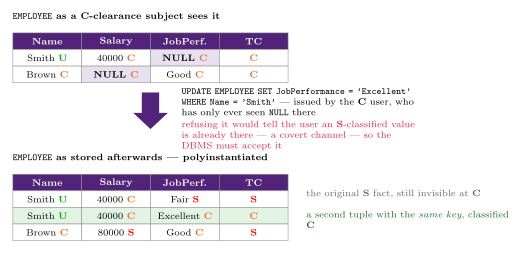
Figure 1: Why a MAC database will store two tuples with the same key. View (b) of EMPLOYEE sits above the stored result (d), with the offending UPDATE on the arrow between them. The point is the chain of forced moves: the C user was shown NULL, so the update is a reasonable thing for them to issue; rejecting it would tell them a higher-classified value is already there, which is the covert channel; accepting it in place would destroy an S-classified fact by writing down over it. Storing both is the only move left, and it is also why an apparently duplicate INSERT succeeds in week12-tutorial-5-1-database-security’s Section B.
DAC vs. MAC
| Discretionary | Mandatory | |
|---|---|---|
| Flexibility | High — owners choose who gets what | Low — rigid, centrally imposed |
| Propagation control | None — DAC doesn’t restrict how information, once accessible, is further shared | Strong — enforces classification rules on every read/write |
| Protection | Weaker | Stronger — prevents illegal information flow |
Role-Based Access Control (RBAC)
Permissions are associated with organisational roles, and users are assigned to the appropriate role(s) — roles can then have DAC or MAC methods applied to them as a unit.
CREATE ROLE manager;
DROP ROLE manager;

GRANT ROLE full-time TO emp_typ1;
GRANT ROLE intern TO emp_typ2;

GRANT privilegeName ON objectName TO {userName | PUBLIC | roleName} [WITH GRANT OPTION];
REVOKE privilegeName ON objectName FROM {userName | PUBLIC | roleName};
A typical hierarchy: users → groups → roles → privileges (e.g. alice is in group admin, which maps to admin_role, which grants ALL ON SERVER server1). RBAC’s flexibility and easier administration make it a popular choice for web-based applications.
Other control measures
Inference control
Statistical databases provide aggregate statistics about a population (e.g. for government statisticians or market researchers) without exposing individual-level confidential data — only statistical queries using aggregates (COUNT, SUM, MIN, MAX, AVG, standard deviation) are permitted:
SELECT COUNT(*) FROM PERSON WHERE <condition>;
SELECT AVG(Income) FROM PERSON WHERE <condition>;
The risk: a narrow enough WHERE condition can isolate a group small enough (even a single individual) that an “aggregate” query effectively discloses that person’s data. Mitigations:
- k-anonymity — enforce a minimum threshold on the number of tuples any query’s result can be based on.
- Prohibit sequences of queries that all refer to the same (or overlapping) population of tuples, which together could be combined to isolate an individual.
- Differential privacy — introduce carefully calibrated noise/ inaccuracy into results.
Flow control
Regulates the distribution of information among accessible objects, verifying information doesn’t flow — explicitly or implicitly — into less protected objects (this is exactly the Bell-LaPadula “no write down” idea, generalised). A flow policy specifies which channels information may move along — e.g. in a simple confidential (C) / nonconfidential (N) scheme, flow from C to N is prohibited. Example: an income tax computing service might be allowed to retain a customer’s address, but not their income/deductions data.
Data encryption
Encryption converts data into ciphertext, using an encryption algorithm and a key; recovering the original data requires the corresponding decryption key.
- DES (Data Encryption Standard) — developed by the US government for general public use.
- AES (Advanced Encryption Standard) — a newer, more difficult to crack standard.
SQL injection
SQL injection is one of the most common threats to a database system: an attacker injects string input through an (often web-facing) application in a way that changes or manipulates the resulting SQL statement to their advantage.
Methods
- SQL manipulation — changes an existing SQL command, e.g. adding conditions to a
WHEREclause. Classic target: the login form. - Code injection — adds entirely new SQL statements/commands by exploiting improper handling of untrusted input.
- Function call injection — inserts a database or OS function call into a vulnerable SQL statement, to manipulate data or make a privileged system call.
SQL manipulation example
A naive login check builds its query by directly concatenating user input:
SELECT * FROM Users WHERE Username = '<input>' AND Password = '<input>';Normal login (Jack / Pass123) produces WHERE Username = 'Jack' AND Password = 'Pass123' — matches the stored row, access granted. But an attacker who knows the username Jack can enter the password field as:
' OR 'x'='xgiving the executed query:
SELECT * FROM Users WHERE username = 'Jack' AND (password = '' OR 'x'='x');'x'='x' is always true, so the AND collapses to just username = 'Jack' — the row is returned regardless of the actual password, and access is granted.
Code injection example
Going further, appending a second statement via a semicolon:
wrongpass' OR 'x'='x'; drop table Users;If the application naively executes whatever SQL string results (and the driver/DBMS allows statement-stacking), this doesn’t just bypass login — it can destroy the entire Users table.
Risks associated with SQL injection
- Database fingerprinting — determining the type of database in use (to target version-specific exploits).
- Denial of service — denying service to valid users.
- Bypassing authentication — gaining access without valid credentials (as shown above).
- Identifying injectable parameters — learning about the backend structure through error messages/behaviour.
- Executing remote commands — running harmful commands remotely (e.g. via function call injection).
- Performing privilege escalation — upgrading the attacker’s own access level.
Protection techniques
- Bind variables (parameterized statements) — pass user input as bound parameters, never concatenated directly into the SQL string. This is the primary defence: the database driver treats parameter values purely as data, never as executable SQL syntax — and as a bonus, it also improves performance (query plans can be cached and reused).
- Filtering input (input validation) — strip/escape characters (like unescaped quotes) that could otherwise be used to break out of a string literal and inject manipulation.
- Function security — restrict which standard and custom database functions are callable, to limit the blast radius of function call injection.
Summary
You should now be able to explain the threats to database security and the CIA principle; describe DAC, MAC, and RBAC and apply them (given grant/revoke commands, or a Bell-LaPadula classification scenario) to determine resulting access; and explain SQL injection, its risks, and how to defend against it. This completes the course content. See week12-tutorial-5-1-database-security for practice.
Reading: the matching textbook material is the database-security chapter of Elmasri & Navathe — Chapter 30 in the 7th edition.
Tutorial 5.1: Database Security
Practice for 2026-05-11-database-security; the mechanisms themselves are collected in database-access-control.
Purpose: assign and revoke privileges using SQL, identify DBMS access errors for given situations, and gain experience identifying privacy violations that occur through a lack of inference control. By the end you should be able to
- use SQL Data Control Language to apply access control to a database system,
- troubleshoot and remedy incorrect permission assignments,
- determine how mandatory access control settings affect the running of common SQL queries, and
- perform a basic database security audit.
Section A — Discretionary Access Control
Universe of discourse: Rob’s Convenience Store has a database system to manage business activities. System admin Paris has created accounts for herself and four staff members, with these requirements:
- Paris (sysadmin) — full access to the whole database, and can grant permissions to others.
- Rachel (HR manager) — full access to
Employee; can view (but not modify)Restock. - Aaron (supply chain lead) — full access to
Item,Restock, andSale. - Chris (customer service) — full access to
Customer; read access toSale. - Emily (security manager, investigates missing stock) — read access to
SaleandRestock; can view only thefName/lNameattributes of bothEmployeeandCustomer.
Schema: Employee [id, fName, lName, role, email], Restock [employee, item, time, quantity] (FKs to Employee.id, Item.id), Item [id, name, description, price], Sale [customer, item, time, quantity] (FKs to Customer.id, Item.id), Customer [id, fName, lName, dob].
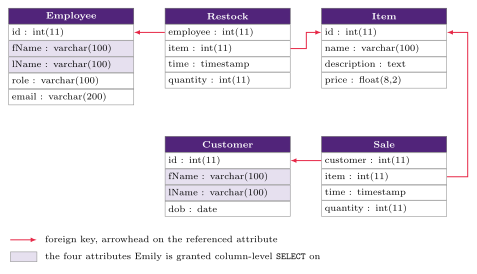
Figure 2: The Rob’s Convenience Store schema the whole of Section A is set on. Each table lists its columns with their types (int(11), varchar(100), timestamp), as a database tool shows them, not in the course’s ER notation. The four foreign keys are crimson arrows pointing FK → PK. The shaded fName/lName columns in Employee and Customer are the four attributes Emily’s column-level grant in A.1/A.2 is about, and they are the reason this exercise needs attribute-level privileges at all.
Question A.1 — Identify and fix incorrect access
The permission table below (as currently configured) contains several errors. Fix it, using the UoD and the schema above. - indicates that the access level for that object is not directly specified; the first column (Paris) has been fixed for you already.
| Paris | Rachel | Aaron | Chris | Emily | |
|---|---|---|---|---|---|
| Employee | ALL PRIVILEGES | ALL PRIVILEGES | UPDATE | - | SELECT |
| Restock | ALL PRIVILEGES | ALL PRIVILEGES | ALL PRIVILEGES | - | SELECT |
| Item | ALL PRIVILEGES | - | ALL PRIVILEGES | - | - |
| Sale | - | - | ALL PRIVILEGES | UPDATE, GRANT | - |
| Customer | SELECT, UPDATE | - | SELECT | ALL PRIVILEGES | - |
| Customer.fName | - | - | - | - | SELECT |
| Customer.lName | - | - | - | - | SELECT |
| Employee.fName | - | - | - | - | - |
| Employee.lName | - | - | - | - | - |
Corrected table (changed cells in bold):
| Paris | Rachel | Aaron | Chris | Emily | |
|---|---|---|---|---|---|
| Employee | ALL PRIVILEGES | ALL PRIVILEGES | - | - | - |
| Restock | ALL PRIVILEGES | SELECT | ALL PRIVILEGES | - | SELECT |
| Item | ALL PRIVILEGES | - | ALL PRIVILEGES | - | - |
| Sale | ALL PRIVILEGES | - | ALL PRIVILEGES | SELECT | SELECT |
| Customer | ALL PRIVILEGES | - | - | ALL PRIVILEGES | - |
| Customer.fName | - | - | - | - | SELECT |
| Customer.lName | - | - | - | - | SELECT |
| Employee.fName | - | - | - | - | SELECT |
| Employee.lName | - | - | - | - | SELECT |
Ten cells change, and each traces to one line of the UoD:
- Paris,
SaleandCustomer: blank /SELECT, UPDATE→ALL PRIVILEGES. She is the sysadmin with full access to the whole database, so every table isALL PRIVILEGES. - Rachel,
Restock:ALL PRIVILEGES→SELECT. She may viewRestockbut “is not allowed to make changes”. - Aaron,
Employee:UPDATE→-, andCustomer:SELECT→-. His remit isItem,RestockandSaleonly; nothing in the UoD gives him any access to staff or customer records. - Chris,
Sale:UPDATE, GRANT→SELECT. He needs read access toSale, soUPDATEis too much — and the grant option is never justified for anyone but Paris. - Emily,
Sale:-→SELECT. She investigates missing stock and needs read access toSaleas well asRestock. - Emily,
Employee:SELECT→-, withEmployee.fNameandEmployee.lName:-→SELECT. This is the pair of changes worth understanding: the UoD gives her only two columns ofEmployee, so table-levelSELECT(which would exposeroleandemailas well) is withdrawn and replaced by attribute-levelSELECT— the same shape herCustomeraccess already had.
The general rule the whole question drills: grant the narrowest privilege that satisfies the stated responsibility — read-only where someone only needs to look, nothing at all on tables outside their remit, and attribute-level SELECT where they need two columns rather than a whole table.
Question A.2 — SQL grant/revoke queries
Using your answer above, write the appropriate SQL queries to fix the user accounts with incorrect permissions. (Extension: import the sample database and test the queries manually.)
Only the four accounts with errors need statements — Paris’s own entries were corrected as the worked example, and no account needs a statement for a cell that was already right (Emily keeps her Restock SELECT and her two Customer columns untouched).
-- Rachel
REVOKE ALL PRIVILEGES ON `Rob's Convenience Store`.`Restock` FROM 'Rachel';
GRANT SELECT ON `Rob's Convenience Store`.`Restock` TO 'Rachel';

-- Aaron
REVOKE ALL PRIVILEGES ON `Rob's Convenience Store`.`Employee` FROM 'Aaron';
REVOKE ALL PRIVILEGES ON `Rob's Convenience Store`.`Customer` FROM 'Aaron';

-- Chris
REVOKE ALL PRIVILEGES ON `Rob's Convenience Store`.`Sale` FROM 'Chris';
REVOKE GRANT OPTION ON `Rob's Convenience Store`.`Sale` FROM 'Chris';
GRANT SELECT ON `Rob's Convenience Store`.`Sale` TO 'Chris';

-- Emily
REVOKE ALL PRIVILEGES ON `Rob's Convenience Store`.`Employee` FROM 'Emily';
GRANT SELECT ON `Rob's Convenience Store`.`Sale` TO 'Emily';
GRANT SELECT (`fName`, `lName`) ON `Rob's Convenience Store`.`Employee` TO 'Emily';
Three points of syntax the solution turns on:
- Downgrading is revoke-then-grant. There is no “set the privilege to
SELECT” statement: youREVOKE ALL PRIVILEGESand thenGRANTback exactly what is wanted (Rachel, Chris, Emily). Where nothing should be left, theREVOKEstands alone (Aaron). REVOKE GRANT OPTIONis a separate statement from revoking the privilege itself. Chris needs both: one to take awayUPDATE, one to take away his ability to pass anything on.- Attribute-level privileges are written as a column list on the privilege, not on the object:
GRANT SELECT (`fName`, `lName`) ON `…`.`Employee`. Backticks quote identifiers containing spaces and apostrophes — hence`Rob's Convenience Store`— and the schema is qualified as`schema`.`table`.
Section B — Mandatory Access Control
Universe of discourse: ASIO (the Australian Security Intelligence Organisation) has created a database to track the identities of its undercover agents. Because some agents’ assignments are riskier than others, a MAC database was implemented to prevent classified information falling into the wrong hands.
Schema:
Spy [ID, fName, lName, dob, email]
CodeName [spyID, name, dateEffective, dateExpired, operation]
Operation [name, description, budget]

CodeName.spyID references Spy.id
CodeName.operation references Operation.nameCodeName’s key is the composite {spyID, name}, which is what makes B.1’s third query an apparent key violation. (The Spy key is written ID in the schema line but Spy.id in the foreign-key line and id in the sample data; it is the same attribute.)
DBMS accounts, low to high:
| Database user | Access level |
|---|---|
| Cody | U (Unclassified) |
| Jane | C (Confidential) |
| Tanya | S (Secret) |
| Jack | TS (Top Secret) |
Sample data
Each value carries its own classification, shown in parentheses; TC is the Tuple Classification, the highest classification of any attribute in the tuple.
Spy — note that fName and lName are both TS, so only Jack can read an agent’s actual name; id is U, dob is C, email is S.
| id | fName | lName | dob | TC | |
|---|---|---|---|---|---|
| 1 (U) | Daniel (TS) | Teal (TS) | 18/06/1995 (C) | bmw@hotmail.com (S) | TS |
| 2 (U) | May (TS) | Lee (TS) | 03/02/1998 (C) | may@stevefam.com (S) | TS |
| 3 (U) | John (TS) | Smith (TS) | 12/05/1990 (C) | john@smith.com (S) | TS |
| 4 (U) | April (TS) | Fuller (TS) | 25/06/1980 (C) | ilikefood@korea.com (S) | TS |
CodeName — the classification of spyID, name and operation varies row by row (in the BBQ row all three are TS); both date attributes are U in every row.
| spyID | name | dateEffective | dateExpired | operation | TC |
|---|---|---|---|---|---|
| 1 (C) | Handbrake (C) | 01/02/2019 (U) | 03/06/2020 (U) | Le-Ferrari (S) | S |
| 2 (C) | BunnyBunny (S) | 12/03/2019 (U) | 12/04/2019 (U) | Hotpot (C) | S |
| 4 (C) | BubbleTea (C) | 19/04/2019 (U) | 24/04/2019 (U) | Hotpot (C) | C |
| 2 (TS) | BBQ (TS) | 27/09/2019 (U) | 04/10/2019 (U) | KimChi (TS) | TS |
Operation — the highest classification anywhere in this table is S, which is what makes Jack’s insert in B.1 illegal.
| name | description | budget | TC |
|---|---|---|---|
| Hotpot (S) | Infiltrate McDonalds and discover the ingredients in the Big Mac secret sauce. (S) | 1000000 (S) | S |
| Le-Ferrari (C) | Identify the leader of an international Ferrari stealing syndicate. (U) | 10000000 (U) | C |
| KimChi (S) | Someone has stolen ASIO’s secret KimChi supply and now the yearly Korean BBQ party is ruined! The thief must be found! (S) | 500000000 (S) | S |
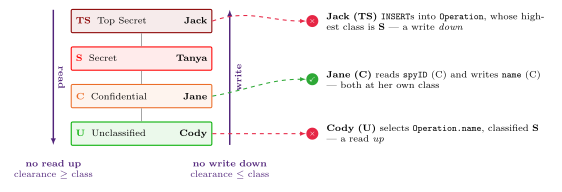
Figure 3: The two Bell–LaPadula rules, with this exercise’s four accounts on the rungs they occupy. The four classes run low to high, U (green), C (orange), S (red), TS (dark red); the three worked outcomes on the right are B.1’s second, fourth and fifth rows. A subject may read anything at or below its own rung and write anything at or above it, so the only unrestricted position is a subject whose clearance exactly matches the data’s class — which is why Jane’s UPDATE at C succeeds while Cody reading up and Jack writing down both fail.
Question B.1 — Identifying security denials
Based on the information above, identify which of the following queries will succeed and which will return nothing / fail to be executed. The first row is the worked example.
| User | Query | S / F | Reason |
|---|---|---|---|
| Cody | SELECT id FROM Spy; |
S | Cody’s classification (U) is ≥ the classification of every id value (U), so the query is valid. |
| Cody | SELECT name FROM Operation WHERE budget > 10000000 |
F | Cody’s level (U) is not ≥ the classification of any of the tuples’ name values (S, C, S). So even though the WHERE condition evaluates true for one tuple (KimChi, 500000000), the query still returns nothing. |
| Cody | INSERT INTO CodeName (spyID, name, dateEffective, dateExpired, operation) VALUES (2, "BBQ", "16/05/2019", "26/05/2019", "Hotpot") |
S | This looks like a key violation — {spyID, name} = {2, BBQ} already exists — but the two “identical” tuples have different security classifications, so the DBMS can apply polyinstantiation to let them co-exist. |
| Jack | INSERT INTO Operation (name, description, budget) VALUES ("Ace", "Find an unidentified hacker who has been using SQL injections to change students' grades to all 7's in Universities around Australia.", 350000) |
F | The security classification of the Operation table is S, that being the highest class of any of its tuples. Jack’s class is TS, which is greater than S, so the query is not executed — it would let information flow from a higher to a lower security classification. |
| Jane | UPDATE CodeName SET name = "Iced Coffee" WHERE spyID = 4 |
S | Jane’s classification (C) is ≥ the classification of the spyID attribute (C), so she has read permission; it is also ≤ the classification of that row’s name attribute (C), so she has write permission. Both hold, so the DBMS processes the update. |
Two things are worth pulling out of that table.
An UPDATE needs both directions to hold at once. Jane’s update reads (WHERE spyID = 4) and writes (SET name = …), so it is subject to both rules — read requires clearance ≥ class, write requires clearance ≤ class. Both are satisfied here only because the attributes involved are classified exactly at her own level. Had that row’s name been U, the same statement would have been a write down and failed.
“Fails” and “returns nothing” are the same answer here. The column is Success (S) or Failure (F), and Cody’s second query is F even though the DBMS does not raise an error — it simply returns an empty result. The question counts the two together (“identify which of the following queries will succeed, and which ones will return nothing / fail to be executed”), so the column is really does the user get an answer. The DBMS stays silent rather than refusing outright because telling a U user “permission denied” would itself disclose that a matching higher-classified tuple exists — the same covert-channel argument that motivates polyinstantiation.
Question B.2 — Returning data in a MAC database
Fill the table and identify what data is returned when the specified users run the query. The first row is the worked example.
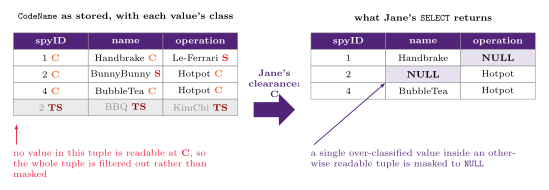
Figure 4: The worked example of B.2, drawn out: the two different things MAC does to a tuple. The left-hand table is the CodeName sample data with each value’s classification, and the right-hand table is what Jane’s query returns. The distinction it makes is the one the remaining B.2 rows turn on: an over-classified value inside a tuple that is otherwise readable comes back as NULL, but a tuple with nothing readable in it does not come back at all — it is not returned as a row of NULLs.
Jane — SELECT spyID, name, operation FROM CodeName (the worked example, drawn out in Figure 4):
| spyID | name | operation |
|---|---|---|
| 1 | Handbrake | NULL |
| 2 | NULL | Hotpot |
| 4 | BubbleTea | Hotpot |
Row 1’s operation (Le-Ferrari, S) and row 2’s name (BunnyBunny, S) are above Jane’s C and come back as NULL; the BBQ row, whose spyID, name and operation are all TS, does not appear at all.
A caveat: the EMPLOYEE example in 2026-05-11-database-security drops a tuple whose key value is unreadable (the U user never sees Brown, because Name is C) — though nothing else in that tuple is readable at U either, so it does not settle which rule is doing the work. Applied strictly to CodeName, whose key is {spyID, name}, that rule would also drop row 2 — BunnyBunny is S — yet the model answer keeps it with name masked. So the test these answers actually apply is “is anything in the tuple readable”, not “is the whole key readable”. Answer the same way.
Jane — SELECT name, dob FROM CodeName, Spy WHERE id = spyID AND dateEffective < "01/06/2020":
| name | dob |
|---|---|
| Handbrake | 18/06/1995 |
| NULL | 03/02/1998 |
| BubbleTea | 25/06/1980 |
The join works because Spy.id is U and CodeName.spyID is C in the three surviving rows — both readable at C, so the pairing can be computed. dob is C throughout, so it is returned in full; BunnyBunny is masked as before; and the BBQ row is again absent (its spyID is TS, so it can neither be read nor joined), which is why there are three rows and not four even though every dateEffective in the table satisfies the condition.
Cody — SELECT name, budget FROM Operation WHERE description LIKE "%a%":
| name | budget |
|---|---|
| NULL | 10,000,000 |
Only Le-Ferrari’s description is U, so it is the only row whose WHERE condition Cody can even evaluate — Hotpot’s and KimChi’s descriptions are S and invisible to him. For that row, budget is U and is returned in full, while name is C and is masked to NULL. Note the shape of the leak this prevents: Cody learns that some operation matching %a% has a ten-million-dollar budget, but not which one.
Jane — SELECT spyID, Operation.name, Operation.budget FROM Operation, CodeName WHERE Operation.name = CodeName.operation: empty set returned. When you complete a join on CodeName and Operation using the operation attribute, in each instance one side of the join is of class S or TS, which is above Jane’s clearance. Hence there are no valid joins and no tuples returned. Concretely: the three joinable pairs are Le-Ferrari (S in CodeName, C in Operation), Hotpot (C in CodeName, S in Operation) and KimChi (TS/S) — each has at least one unreadable end, so the equality can never be established at C.
This is the sharpest MAC result in the tutorial: a join can return the empty set even though matching rows plainly exist, and even though the user can see parts of both tables.
Bonus — Completing a database audit
Universe of discourse: SummerStyles is a clothing retailer which uses a DBMS to store all its staff, customer and stock information. Every month it performs a database audit to check for unauthorised changes to company records and to identify potential privacy violations.
Task: using the log below, identify potential cases of privacy breaches or unauthorised modification of data. Hint: there is no exact formula — use your intuition and common sense to flag potential cases where you feel it is possibly a security breach.
The log has the column shape of a MySQL general query log: each entry records event_time, user_host, thread_id, server_id, command_type (every row here is Query) and the argument — the statement as issued. That “who ran what, and when” shape is exactly the system log that database-access-control describes an audit as reading.
event_time            user_host                argument
17-05-2020 8:27:18am  SystemAdmin@localhost    SHOW COLUMNS FROM SummerStyles.customer
17-05-2020 8:28:00am  SystemAdmin@localhost    SHOW INDEXES FROM SummerStyles.customer
17-05-2020 8:30:07am  HRManager@localhost      UPDATE SummerStyles.staff SET Wage = Wage * 1.1
17-05-2020 8:31:07am  CustomerService@localhost SELECT * FROM SummerStyles.customer WHERE fName="Elaine" AND lName="Wang"
17-05-2020 8:33:30am  SystemAdmin@localhost    SELECT TABLE_NAME FROM information_schema.VIEWS WHERE TABLE_SCHEMA='SummerStyles' AND TABLE_NAME='Customer'
17-05-2020 8:35:05am  CustomerService@localhost SELECT fName, lName, max(wage) FROM SummerStyles.staff
17-05-2020 8:35:43am  StockManager@localhost   DELETE FROM SummerStyles.deliveries WHERE id = 204472
17-05-2020 8:38:32am  StockManager@localhost   UPDATE SummerStyles.currentStock SET quantity = quantity + 8 WHERE stockID = 1263
17-05-2020 8:41:14am  SystemAdmin@localhost    ALTER TABLE SummerStyles.staff ADD email varchar(255);
17-05-2020 8:45:41am  HRManager@localhost      INSERT INTO SummerStyles.staff (id, fName, lName) VALUES (142, "Leya", "Rebecca")
17-05-2020 8:57:37am HRManager@localhost UPDATE SummerStyles.stock SET price = 11.00 WHERE name LIKE "%Calvin Klein%"Exactly two entries should be flagged:
- 8:35:05am —
CustomerService:SELECT fName, lName, max(wage) FROM SummerStyles.staff. A customer service account querying staff wage data is well outside its remit — salary information is HR’s domain. A potential privacy breach. - 8:57:37am —
HRManager:UPDATE SummerStyles.stock SET price = 11.00 WHERE name LIKE "%Calvin Klein%". An HR account modifying product pricing is outside HR’s duties — the stock tables areStockManager’s domain, and that account’s own two entries in this log are both stock changes. A potential unauthorised modification.
Both share the same tell, and it is the one the audit is looking for: the statement is perfectly legal SQL that the account had the privileges to run, and it is the role, not the syntax, that is wrong. Which is the argument for A.1’s narrow grants — had CustomerService never been given SELECT on staff in the first place, there would have been nothing to find in the log.
Worth not flagging, and knowing why: the HRManager wage rise at 8:30:07 (an across-the-board UPDATE on staff.Wage with no WHERE looks drastic, but it is HR’s own table and its own business); the CustomerService lookup of one named customer at 8:31:07 (exactly what customer service does); and the SystemAdmin SHOW/ information_schema queries and ALTER TABLE (schema administration, which is that account’s whole purpose).
Reference material
Database Access Control
Access control is the DBMS’s answer to “who is allowed to do what to which data”. It’s one of four categories of database control measure, and by far the largest — three distinct authorisation mechanisms (DAC, MAC, RBAC), each with its own model and syntax. Introduced in 2026-05-11-database-security.
What security is protecting against
Threats to a database are usually framed with the CIA principle:
| Threat | Meaning |
|---|---|
| Loss of confidentiality | Unauthorised disclosure of confidential information |
| Loss of integrity | Improper modification of information |
| Loss of availability | A legitimate user cannot access data objects |
The motivations for defending against them are legal or policy-driven (government rules protecting medical records or financial ratings), ethical (who may see salary packages or student grades), and technical (malware, performance overloading).
Privacy is not the same as security
- Security concerns how access to data is controlled — availability for use, with integrity, and permitted access only.
- Privacy concerns how data may be used — an individual’s ability to control the terms under which their sensitive data is acquired and used.
Security is a required building block for privacy, but the two are distinct: privacy also covers information that can be inferred from accessible data, not only what is directly readable. Sensitive data is often double-edged — patient records are private but valuable for public-health research; CCTV audio captures private conversations but also evidence of crime — giving a utility/privacy trade-off: protect all sensitive data while making as much non-sensitive data available as possible.
The four control measures
| Measure | Purpose |
|---|---|
| Access control | Provide access only to users with the right access authority |
| Inference control | Ensure information about individuals can’t be derived indirectly (statistical databases) |
| Flow control | Prevent information flowing to unauthorised users |
| Data encryption | Protect sensitive data in transit |
The rest of this note is access control; the other three are summarised at the end.
Discretionary Access Control (DAC)
DAC is built on granting and revoking privileges — GRANT and REVOKE being SQL’s DCL family, alongside the DDL and DML of sql-ddl:
CREATE USER <username> IDENTIFIED BY "<password>";

GRANT  privilegeName
ON     objectName
TO     {userName | PUBLIC | roleName}
[WITH GRANT OPTION];

REVOKE privilegeName
ON     objectName
FROM   {userName | PUBLIC | roleName};
Two levels of privilege
- Account level — privileges held by an account independent of any particular relation:
CREATE SCHEMA/TABLE/VIEW,ALTER/DROP TABLE, and modification (INSERT/DELETE/UPDATE) andSELECTprivileges. - Relation level — privileges on a specific relation or view, and optionally on individual attributes: select (read), modification (insert/delete/update), and references. The
REFERENCESprivilege grants permission to create a foreign key pointing at the named table (see integrity-constraints) — worth noting because it’s a privilege about schema structure, not data access.
The three statement forms that repairing a real set of accounts needs — all three used in week12-tutorial-5-1-database-security:
-- everything the account holds on that object, in one statement
REVOKE ALL PRIVILEGES ON `schema`.`Table` FROM 'user';

-- the ability to delegate, revoked separately from the privilege itself
REVOKE GRANT OPTION ON `schema`.`Table` FROM 'user';

-- attribute level: the column list attaches to the privilege, not the object
GRANT SELECT (`fName`, `lName`) ON `schema`.`Table` TO 'user';
There is no statement that narrows a privilege. Downgrading an account from ALL PRIVILEGES to SELECT is always a REVOKE ALL PRIVILEGES followed by a GRANT SELECT, and taking away someone’s grant option is a second statement on top of taking away the privilege they were delegating.
Privileges can be issued as part of schema creation:
CREATE SCHEMA AUTHORIZATION oe
    CREATE TABLE Product (color VARCHAR2(10) PRIMARY KEY, quantity NUMBER)
    CREATE VIEW RedProduct AS
        SELECT color, quantity FROM Product WHERE color = 'RED'
    GRANT select ON RedProduct TO hr;
The access matrix model
Every relation is assigned an owner account, and owners may grant select/modification/references privileges on anything they own. The resulting state is an access matrix M(i, j) — the privileges user i holds on object j. Attribute-level entries appear as their own rows:
| Jake | Aiden | Nelly | Sham | |
|---|---|---|---|---|
| Customer | READ | READ | MODIFY | — |
| CustOrder | — | — | READ | — |
| CustOrder.amt | — | READ | READ | — |
| Supp.status | — | READ | MODIFY | REFERENCE |
| Supp.address | — | READ | MODIFY | MODIFY |
Building this matrix from a Universe of Discourse is what Section A of week12-tutorial-5-1-database-security asks for: read each person’s stated responsibilities, and grant the narrowest privilege that satisfies them — read-only where they only need to look, nothing at all on tables outside their remit, attribute-level SELECT where they need two columns rather than a whole table.
Propagation and revocation
REVOKE cancels a privilege, which makes temporary grants possible. The complication is delegation: if A grants a privilege to B WITH GRANT OPTION, B can grant it onward without A’s knowledge, so the DBMS must track the resulting chain of dependency:
REVOKE privilegeName ON objectName FROM userName [RESTRICT | CASCADE];CASCADE— revoke the privilege and every dependent privilege granted as a result of it.RESTRICT— refuse the revoke with an error if the privilege has already been passed on.
The governing rule is graph-shaped:
A user’s authorisation is valid iff there is a path from the root of the authorisation graph down to that user’s node.
So for u1 → u2 → u3: revoking u1’s grant to u2 also cuts off u3, because no path to u3 remains. Revoking directly from u3 leaves u2 untouched, and u2 losing authorisation never propagates upward to u1 — the grantor’s own authorisation is independent of what they’ve handed downstream.
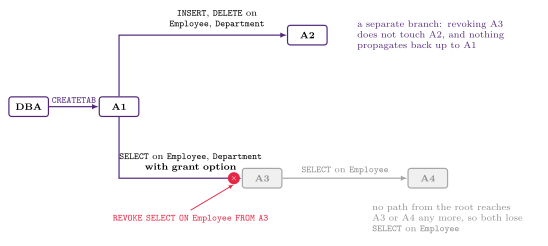
Figure 5: The A1–A4 grant chain from Worked chain below, drawn as the authorisation graph the path rule is stated over. Nothing here is a house convention. Revocation is about reachability, not about who was named in the REVOKE: A4 is never mentioned in the statement and loses the privilege anyway, purely because the edge it depended on is gone, while A2 on the untouched branch keeps everything.
Views as a security mechanism
If an owner wants to give an account a limited read capability — some columns only, or only rows meeting a condition — the idiomatic answer is to create a view and grant on the view rather than the base table (see sql-views):
-- Employee [ssn, name, dob, address, sex, salary, mgrSSN, dNum]
CREATE VIEW A3EMPLOYEE AS
    SELECT name, dob, address
    FROM   EMPLOYEE
    WHERE  dNum = 5;

GRANT SELECT ON A3EMPLOYEE TO A3;
A3 can now only ever see name, dob and address for department 5 — never salary, never ssn, never another department’s staff. The view is doing both column filtering and row filtering that a table-level GRANT could not express.
Worked chain
The DBA runs GRANT CREATETAB TO A1; A1 creates Employee and Department and then runs:
GRANT INSERT, DELETE ON Employee, Department TO A2;
GRANT SELECT ON Employee, Department TO A3 WITH GRANT OPTION;- Can
A3runGRANT SELECT ON Employee TO A4? Yes —A3holds the grant option. - If
A1then runsREVOKE SELECT ON Employee FROM A3, doesA4keepSELECT? No — it’s revoked by propagation; no path from the root reachesA4any more. - What kind of access control is this? Discretionary — privileges are granted and revoked at the discretion of individual account owners, not fixed by a system-wide classification (MAC) or role hierarchy (RBAC).
Mandatory Access Control (MAC)
MAC classifies both data and users into security classes to provide multilevel security. The typical classes, low to high, are Unclassified (U) < Confidential (C) < Secret (S) < Top Secret (TS). Users are subjects; data — a table, tuple, or individual attribute value — are objects.
The Bell-LaPadula model
| Property | Rule | Effect |
|---|---|---|
| Simple security property (“no read up”, NRU) | A subject can’t read an object classified above its own clearance | A U user can’t view a C-classified salary |
| Star property (“no write down”, NWD) | A subject can’t write to an object classified below its own clearance | An S-cleared user can’t insert a tuple containing only C-classified data |
“No write down” is the counter-intuitive one. It exists to stop information flowing downward: if a high-clearance subject could write into a low-classified object, the content of that write would leak higher-clearance context to lower-clearance readers.
Each tuple carries a Tuple Classification (TC) — the highest classification of any of its attribute values — and a table’s classification is in turn the highest TC of any tuple in it, which is the level the star property is applied at when someone writes to the table as a whole. A user sees a filtered version of the relation:
(a) EMPLOYEE (as stored)
Name       Salary      JobPerformance  TC
Smith (U)  40000 (C)   Fair (S)        S
Brown (C)  80000 (S)   Good (C)        S

(b) as seen by a Confidential-clearance user
Smith (U)  40000 (C)   NULL (C)        C
Brown (C)  NULL  (C)   Good (C)        C

(c) as seen by an Unclassified-clearance user
Smith (U)  NULL (U)    NULL (U)        U
There are two levels of hiding, both of which the tutorial tests:
- An individual over-classified cell inside a tuple the user can otherwise see is masked to
NULL— Smith’sJobPerformanceabove, and everyNULLin the tutorial’s Section B answers. - A tuple with nothing readable left in it disappears entirely — it is not returned as a row of
NULLs. That is why Brown vanishes from view (c): atU, none ofBrown(C),80000(S) orGood(C) is readable, so there is nothing left to show.
The exact test for the second case is worth being careful about. A high TC alone does not remove a tuple — in the tutorial, rows classified S are still returned to a C user with their S cells masked. Nor is an unreadable key enough on its own: CodeName’s key is the composite {spyID, name}, and the tutorial’s answers still return the BunnyBunny tuple to a C user with its S-classified name masked. What removes a tuple is having no readable value in it at all. A join between two tables can therefore return the empty set even when matching rows plainly exist, if every candidate pairing has at least one over-classified side — the join condition simply cannot be established at the user’s level.
Polyinstantiation
Suppose a C-clearance user, seeing view (b), runs UPDATE EMPLOYEE SET JobPerformance = 'Excellent' WHERE Name = 'Smith'. The system must not reject it — a rejection would reveal that a higher-classified value already exists, which is itself a leak (a covert channel). The resolution is polyinstantiation: keep multiple tuples with the same key at different classifications.
(d) EMPLOYEE, polyinstantiated
Smith (U)  40000 (C)   Fair (S)        S
Smith (U)  40000 (C)   Excellent (C)   C
Brown (C)  80000 (S)   Good (C)        S
The C user sees “Excellent”; an S-or-higher user still sees the original “Fair”. The same mechanism is why an apparent key-constraint violation can succeed in a MAC database — two “identical” tuples at different classifications are allowed to coexist.
DAC vs MAC
| Discretionary | Mandatory | |
|---|---|---|
| Flexibility | High — owners choose who gets what | Low — rigid, centrally imposed |
| Propagation control | None — once information is accessible, DAC doesn’t restrict onward sharing | Strong — classification rules enforced on every read and write |
| Protection | Weaker | Stronger — prevents illegal information flow |
Role-Based Access Control (RBAC)
Permissions attach to organisational roles; users are assigned to roles, and DAC or MAC methods are then applied to the role as a unit:
CREATE ROLE manager;
DROP ROLE manager;

GRANT ROLE full-time TO emp_typ1;
GRANT ROLE intern TO emp_typ2;

GRANT  privilegeName ON objectName TO   {userName | PUBLIC | roleName} [WITH GRANT OPTION];
REVOKE privilegeName ON objectName FROM {userName | PUBLIC | roleName};
The typical hierarchy is users → groups → roles → privileges — e.g. alice is in group admin, which maps to admin_role, which holds ALL ON SERVER server1. RBAC’s flexibility and much easier administration (change the role, not every user) make it the popular choice for web-based applications.
Beyond access control
Inference control
A statistical database publishes aggregate statistics about a population — for government statisticians or market researchers — without exposing individual records, so only aggregate queries (COUNT, SUM, MIN, MAX, AVG, standard deviation) are permitted (see sql-aggregation-and-grouping):
SELECT COUNT(*)   FROM PERSON WHERE <condition>;
SELECT AVG(Income) FROM PERSON WHERE <condition>;
The risk is that a sufficiently narrow WHERE clause isolates a group small enough — possibly a single person — that the “aggregate” discloses an individual. Mitigations:
- k-anonymity — enforce a minimum number of tuples any result may be based on.
- Prohibit query sequences over the same or overlapping populations, which could be differenced to isolate an individual.
- Differential privacy — add carefully calibrated noise to results.
Flow control
Regulates the distribution of information among accessible objects, verifying that information doesn’t flow — explicitly or implicitly — into less protected objects. This is Bell-LaPadula’s “no write down” generalised beyond a single DBMS. A flow policy names the channels information may travel along; in a simple confidential (C) / nonconfidential (N) scheme, C → N flow is prohibited. Example: an income tax computing service may be allowed to retain a customer’s address, but not their income and deductions.
Data encryption
Encryption converts data into ciphertext using an algorithm and a key; recovering the original requires the corresponding decryption key. DES (Data Encryption Standard) was developed by the US government for general public use; AES (Advanced Encryption Standard) is the newer, harder-to-crack replacement.
See also
- sql-injection — the attack that bypasses all of this by making the application issue the attacker’s SQL under its own privileges
- sql-views · integrity-constraints · sql-aggregation-and-grouping
- 2026-05-11-database-security — Module 5
- week12-tutorial-5-1-database-security — DAC permission-matrix, MAC query and audit practice
INFS1200 Diagram Notation
Reference legend for every diagram family in INFS1200 except ER/EER symbols and ER-to-relational mapping, which are already covered by er-diagram-notation and relational-mapping-notation. This note covers relation schemas and instances drawn as tables, foreign-key figures, constraint-violation figures, relational-algebra notation, SQL presentation, functional-dependency notation, and normalisation/decomposition figures — plus a section confirming whether the ER diagrams really are drawn to the Chen conventions the existing note asserts.
Everything below was inferred from the course’s own PDFs. Where a convention is stated by the course rather than merely practised, that is called out.
What was sampled
The course ships two written guides, both one page, and both already covered by the sibling notes: the EER & ER Notation Guide (naming only — entity/relationship names capitalised and space-free, attributes UpperCamelCase) and the Relational Mapping Guide (Relation [attr, ...] schema form, table names UpperCamelCase, attributes lowerCamelCase, X.fk references Y.pk). Neither guide says anything about symbol shape, colour, line style, table presentation, algebra notation, FD notation or figure layout. Every convention in this note beyond naming was inferred from the drawings.
Deck shorthand used in citations below:
| Cite | File | Pages |
|---|---|---|
| L0 | infs1200-lecture-0.pdf (Module 0: Introduction / DBMS) |
64 |
| L1 | infs1200-lecture-1.pdf (Module 1: ER Model) |
60 |
| L2 | infs1200-lecture-2.pdf (Module 2: Relational Model + Mapping) |
94 |
| L3 | infs1200-lecture-3.pdf (Module 3: SQL) |
191 |
| L4 | infs1200-lecture-4.pdf (Module 4: Design Theory) |
114 |
I read 261 of the 523 deck pages as rendered images, plus both guide pages in full, plus a plain-text extraction of all 523 pages used to locate the pages carrying drawings. Specifically:
- L0: pp. 42–48, 59–63 (12 of 64)
- L1: pp. 28–34, 41–53 (20 of 60)
- L2: pp. 5–36, 43–58, 61–74, 76–93 (80 of 94)
- L3: pp. 5–9, 46–60, 71–82, 86–104, 106–118, 145–161 (81 of 191)
- L4: pp. 8–27, 52–70, 84–112 (68 of 114)
I did not read L0 pp. 1–41 and 49–58, L1 pp. 1–27 and 35–40, L3 pp. 10–45, 61–70, 83–85, 119–144, 162–191, or L4 pp. 1–7, 28–51, 71–83. The unread stretches are mostly prose, quiz slides and the generative-AI section; sampling targeted pages that carry drawings.
There is no Module 5 (Database Security) deck in the source set at all — only roadmap bullets naming it (L0 p63, L3 p2, L4 p3). See Not established.
The palette
Colours are used systematically enough to be treated as notation. Sampled directly from the rendered PDFs, so these are exact:
| Hex | Name used below | Meaning |
|---|---|---|
#51247A |
UQ purple | Entity-type fill; table header fill; section-bar fill; derived/answer text |
#962A8B |
magenta | Relationship-diamond fill |
#E6E6E4 / #E7E6E6 |
light grey | Attribute-oval fill; alternating table body row; definition box; “this one is wrong” query box |
#E6E0EF |
pale lavender | Schema-reference box; SQL syntax-template box; quiz-stimulus box; side-note box |
#D1F2D3 |
pale green | A query being demonstrated as correct |
#2EA836 |
green | ✓ badge; “this is legal / this is the good design” |
#E62645 |
crimson | ✗ badge; foreign-key arrows; “this violates the constraint” outlines |
#C00000 / #CB0000 |
dark red | Emphasis on a term being defined, in running prose |
Consistency: the purple/magenta/light-grey trio holds for every ER diagram in L1 and L2. The green-✓/crimson-✗ pairing holds across L2, L3 and L4 — it is the single most consistent visual convention in the course. The pale-green query box appears throughout L3 only (SQL is only taught there).
Relation schemas written as text
Follows the written guide, and is used identically in all four content decks.
Relation [attr1, attr2, ...], space before the bracket, primary key underlined. L2 pp. 15, 22, 30, 89–93; L3 pp. 49, 51, 56, 60, 87, 92–95, 109, 111, 112, 115; L4 pp. 56–59, 63, 64, 66, 68, 85, 88, 90, 93, 106, 107. Throughout the semester.- A composite primary key gets one continuous underline spanning all its attributes, not one underline per attribute —
Enrollment [sid, cid, department, grade]with a single rule under the first three. L2 pp. 30, 86, 90–93; L3 p49 (StarsIn [movieID, starID, role]); L4 p66. Consistent. - Foreign keys are written on their own line directly under the referencing relation:
Employee.department references Department.id. Composite FKs use brace sets on both sides:Account.{bankCode, branchNo} references Branch.{bankCode, branchNo}. L2 pp. 27, 30, 57, 86, 90–93. Consistent. - Schema listings shown as reference material for a query or example sit in a pale-lavender box with a thin black border. L2 pp. 15, 27, 30; L3 pp. 49, 51, 54, 56, 57, 59, 60, 87, 92–96, 104, 109, 111, 112, 115, 151–161. Throughout Module 3.
Relation instances and result tables
The single most-repeated figure in the course. Identical in L0, L2, L3 and L4.
- Header row: solid UQ purple
#51247A, white bold text, one attribute name per cell. - Body rows: alternate light grey
#E6E6E4and white, starting with grey in row 1. - Borders: thin black, on all cells.
- Relation name: bold black, above the table, centred. L0 p46; L2 pp. 8, 10–13, 15, 17, 18, 23, 25–29, 35, 36, 74; L3 pp. 88, 89, 93–95, 98, 103, 112, 118, 146–150, 159–161; L4 pp. 9, 10, 15, 24, 26, 27, 45, 53, 54, 60, 66. Throughout the semester.
- Alignment is left in every table observed; numbers are not right-aligned.
- Key attributes are underlined in the purple header when the figure is about keys: L2 p74 (
PK1,PK2), L4 p66 (studentID,courseID). Elsewhere headers are not underlined. Used twice — treat as available, not required. - A query result table uses exactly the same styling as a base-relation table; the only difference is that it carries no relation-name caption, and its headers are the projected expressions themselves —
COUNT(*),AVG (salary)wrapping over two lines. L3 pp. 49, 73–76, 79, 93–95, 103, 112. Consistent in Module 3. - Empty cells in a multiple-choice distractor are drawn as a grey cell with no content (L1 p34, L3 p118). Seen twice.
Highlighting inside a table
A small, stable vocabulary:
| Device | Meaning | Citation |
|---|---|---|
| Thin red ellipse drawn over a cell or column | “look at this value” — sometimes the topic, sometimes the offence | L2 pp. 8, 10, 25, 26, 31, 33 |
| Heavy black rectangle outline around a whole row | the row under discussion | L2 pp. 31, 33; L4 p27 |
| Pale cyan/light-blue fill on rows or a rounded cyan outline on cells | the rows that demonstrate the problem | L4 p15; L3 pp. 159–161 |
| Pale tint on a column, matched between two tables | pairs a foreign-key column with the primary-key column it references | L2 pp. 28, 29 |
| Thick black diagonal strike-through across a row | this candidate has been ruled out | L3 pp. 159–161 |
| Green ✓ beside a row | this candidate qualifies | L3 pp. 160, 161 |
| Red text in a result-table cell | a spurious tuple produced by a lossy join | L4 p18 |
Consistency: the red ellipse and the black row-outline recur across L2 and L4. The cyan devices are confined to L3 pp. 159–161 and L4 p15.
Foreign keys drawn as arrows
Two distinct arrow renderings, both meaning the same thing, both with the arrowhead landing on the referenced attribute (i.e. the arrow points FK → PK, from the child to the parent). This direction never varies.
- Over tables: thick crimson
#E62645orthogonal (right-angled) elbow arrows drawn above the tables, from the FK column heading, up and across, down into the referenced PK column heading. L2 pp. 27, 29. - Inside a schema box: thin arrows from the FK attribute to the referenced attribute. Drawn diagonally/curved in L3 pp. 49, 51, 56, 60, 93–95, 109, 111, 112, 115; drawn as black orthogonal elbows in L3 pp. 54, 57, 59, 73–76, 79, 80, 87, 92, 96, 97, 104. Both idioms are used constantly in Module 3.
- L2 p27 is the only slide carrying an explicit legend line for it:
Foreign Keys Attribute ——▸ Referenced attribute, in magenta text under the schema box. That legend is the authority for the direction. - Textual constraint captions sit under the table as plain black prose (
Department.manager references Employee.id), in addition to the arrows. L2 pp. 27, 28, 29.
Constraint-violation figures (✓ / ✗)
The course’s standard way of showing “this is illegal, that is legal”:
- The candidate tuple is drawn as a detached one-row table below the relation it would be inserted into.
- An illegal tuple gets a crimson
#E62645outline and a crimson circle with a white ✗; a legal tuple gets a green outline and a green circle with a white ✓. L2 pp. 21, 25, 26, 31, 33, 35, 36. Consistent through the integrity-constraints section. - The same ✓/✗ badges are reused for anything that has a right and a wrong version: two candidate SQL queries (L3 pp. 104, 111, 113), two candidate decompositions (L4 pp. 15, 26, 27), two design approaches (L4 p109). In L3 the losing query’s box is light grey and the winning one’s is pale green; the badge sits at the box’s top-left (L3 p104) or top-right (L3 pp. 111, 113). Semester-wide for the badges; box-fill pairing is Module 3 only.
- The five integrity-constraint types each get a fixed fill on a rounded “one-square-corner” banner, reused every time that type is discussed: domain = magenta-pink, key = gold/tan, entity integrity = cyan, referential integrity = grey, semantic integrity = UQ purple. L2 pp. 20, 21, 25, 26, 31, 32, 33. Consistent within Module 2; never reused elsewhere.
ER diagrams: do they match the Chen conventions er-diagram-notation states?
Yes — with fills and colours the existing note does not record. The lectures carry their own two-slide Notation Guide (L1 pp. 50–51), which is the authority. Drawn form:
| Symbol | Drawn as | Citation |
|---|---|---|
| Entity type | Solid UQ purple rectangle, white text, ALL CAPS name | L1 pp. 41–44, 46–49, 50, 51; L2 pp. 48, 50–53, 55, 56, 58, 66–72, 85, 88 |
| Weak entity type | The same purple rectangle nested inside a second black rectangle (double border) | L1 pp. 41–44, 50; L2 pp. 48, 55, 56, 58, 88 |
| Attribute | Light grey ellipse, thin black border, black text, joined by a thin plain line | L1 pp. 41–44, 47–50; L2 pp. 48, 50–53, 56, 58, 88 |
| Key attribute | Same, name solid-underlined | L1 pp. 41–44, 48, 50; L2 pp. 48, 88 |
| Partial key attribute | Same, name dash-underlined | L1 pp. 41, 42, 44, 50; L2 pp. 48, 55, 56, 58, 88 |
| Multivalued attribute | Light grey ellipse with a double black outline | L1 p50; L2 pp. 48, 50, 52 |
| Derived attribute | Light grey ellipse with a dashed outline, joined by a dashed line | L1 p50; L2 pp. 48, 52 |
| Relationship type | Magenta diamond, white text, ALL CAPS name | L1 pp. 43, 44, 48–51; L2 pp. 48, 50–53, 66–72, 85, 88 |
| Identifying relationship | Magenta diamond nested inside a second diamond outline | L1 pp. 43, 44, 50; L2 pp. 48, 55, 58, 88 |
| Cardinality ratio | Plain black 1 / N / M, placed on the edge near the entity end |
L1 pp. 31–34, 41–43, 51; L2 pp. 48, 88 |
| Total participation | Double line on that entity’s edge into the diamond | L1 pp. 42, 43, 51; L2 pp. 48, 62, 88 |
| Subclass | ⊂ drawn as an open arc on the connecting line, with the arc’s opening facing the superclass |
L1 pp. 46–49, 51; L2 pp. 48, 85 |
| Several subclasses | A small light-grey circle joining the subclass lines to the superclass; each subclass line carries its own arc | L1 pp. 48, 49, 51; L2 pp. 48, 85 |
| Disjoint / overlapping | d / o inside that circle |
L1 pp. 48, 49, 51; L2 pp. 48, 85 |
| Total / partial specialisation | Double / single line from the superclass down to the circle | L1 p49 (legend + figure) |
| Role name (recursive relationship) | Plain lowercase black text beside the line | L2 p48 (supervisor, supervisee) |
So the existing note’s symbol list is correct; it just does not record that entities are filled purple, relationships filled magenta, and attributes filled grey — which is what makes a hand-drawn INFS1200 diagram look like an INFS1200 diagram. That is also why the Mermaid approximations described at the bottom of er-diagram-notation are a genuine substitute rather than a reproduction: Mermaid cannot produce the double-outline shapes, the dashed ellipse, the underline styles, or the ⊂ arc.
Layout: no fixed flow direction. Entity boxes sit on a rough horizontal spine with attributes fanned above and below (L1 pp. 41–44; L2 p88); specialisation hierarchies run top-down with the superclass on top (L1 pp. 47–49).
Instance-level (“ball and line”) relationship diagrams
Used only to explain cardinality ratios, and the ellipse outline colour is semantic:
- Two (or three) vertical ellipses, each holding dots for entity instances, joined by thin black straight lines for relationship instances.
- Ellipse outline colour encodes the ratio, and the same colour is reused as an inline badge on the worked examples: purple
#51247A= 1:1, orange#EB602B= N:1, blue#4085C6= 1:N, green#2EA836= M:N. Defined on L1 p30 and reused on pp. 31, 32, 33. Consistent across four slides, and used nowhere else. - L1 p29 uses a different idiom for the same idea: purple person/item icons with green arrows inside a solid green box for what is allowed and red arrows inside a dashed red box for what is not. Single instance.
ER-to-relational mapping figures
- Slides are two-panel: “ER Diagram” (bold black heading) on the left/top, “Mapping to Relation” on the right/bottom. L2 pp. 50–53, 55, 56, 61, 62, 65–68, 71, 72, 76, 77, 83–85. Consistent through the mapping section.
- The rule box stating the step is a rounded rectangle with a solid fill and white text, and its fill colour tracks the step group shown on the roadmap slide (L2 p47): UQ purple for steps 1–2 (entities/weak entities), gold/tan for steps 3–5 (binary relationships), magenta for steps 6–7 (multivalued / N-ary), slate for the EER subclass step. L2 pp. 50, 55, 61, 65, 71, 76, 78, 83. Consistent — the colour is load-bearing, not decorative.
- The “Mapping to Relation” panel is a rounded rectangle with a purple border and white fill. What the current step adds is written in red; what was already there stays black. L2 pp. 50, 55, 61, 65–68, 71, 72, 76, 77,
- (One exception — see Inconsistencies.)
- Explanatory side notes sit in a pale-lavender rounded rectangle with a purple border. L2 pp. 51–53, 56, 62.
- Diagram annotations (e.g. “Total Participation”) are black text in a purple-bordered white box, joined to the thing they label by a purple wedge pointer. L2 p62. Single instance.
- Lecturer commentary on a diagram is red text with thin red arrows — L1 p44, L2 pp. 59, 74. Recurs; the standard callout style.
Progressive schema build-up
The course builds a schema across consecutive slides and marks “what is new” — but in two different ways. See Inconsistencies; both are recorded here:
- Grey-out idiom: previously-established lines are grey, the newly-added lines are black, foreign-key lines are italic. L2 pp. 54, 57, 63, 69, 73.
- Bold idiom: everything stays black and the newly-added lines are bold. L2 pp. 89–93.
The “Final Schema” summary is enclosed in a crimson rounded-rectangle outline, laid out in two columns, with all foreign-key lines in italic. L2 p86. Single instance, but it is the canonical worked answer.
The same grey-out idiom marks progress through the normal forms: on the “Normalisation – Overview” slide all four normal forms are listed and every one except the current is greyed. L4 pp. 49, 50, 51, 55, 61, 67, 80. Consistent.
Relational algebra notation
The course teaches relational algebra as motivation for SQL, not as a calculus you write. Only some operators get symbols:
| Operator | Symbol as written | Citation |
|---|---|---|
| Join / natural join | ⋈ (bowtie), written infix: R₁ ⋈ R₂ |
L3 pp. 90, 91 (“Denoted as ⋈”); L4 pp. 16, 17 |
| Cartesian product | X — a plain capital letter X, not ×: R1 X R2 |
L3 pp. 88, 89, 91 (“denoted as X”) |
| Theta-join condition | θ ∈ {=, ≠, <, >, ≤, ≥} |
L3 p99 |
| Union / intersection / difference | ∪ / ∩ / −, named as “the relational algebra operations” |
L3 pp. 106, 107, 116 |
| Division | Written both as A/B (R1/R2) in prose and as ÷ in figures |
L3 pp. 145–151 |
| Relation cardinality | vertical bars around the relation name, e.g. \|R1\| = m, \|R1 X R2\| = m * n |
L3 p88 |
| Result of a decompose-then-join round trip | R' (prime) |
L4 p18 |
There is no σ and no π anywhere in the sampled pages. Selection and projection are introduced purely as SQL clause names — “Projection (SELECT clause)” (L3 p48), “Selection (WHERE clause)” (L3 p55) — never as algebraic operators. Do not write σ_{cond}(R) or π_{attrs}(R) in an INFS1200 note; the course has no such notation.
Operator figures — a relational-algebra operation applied to concrete tables is drawn one of two ways:
- Operand tables at left, a thick UQ-purple block arrow between them and the result, with the expression (
R₁ ⋈ R₂) as a black label above the arrow. L3 p90; L4 pp. 16, 18. Consistent. - Operand tables side by side with the operator glyph set large between them and the result table after an
=. L3 pp. 88 (X), 148 (÷), 151 (÷). - Relation names for schematic tables (
R,R₁,R₂,S,A,B1,B2) are placed to the left of the table (L3 pp. 90, 149, 150; L4 pp. 14, 16,- or centred above it (L3 pp. 103, 146–148; L4 p18 for
RandR'). Both are common.
- or centred above it (L3 pp. 103, 146–148; L4 p18 for
Set-operation Venn diagrams
Two incompatible idioms, both in Module 3:
- Black outline, diagonal hatching for the selected region, in a bordered 3-row legend table (Union / Intersection / Difference). L3 p106.
- Colour-filled circles (yellow intersection, magenta left, orange right) for the join types, with lowercase function-style captions
inner_join(x, y),left_join(x, y). L3 p102 — visibly an imported graphic (dplyr-style), not the course’s own drawing.
SQL presentation
This is where the course is most systematic, and it states its own legend.
Syntax templates (how a statement is specified) sit in a pale-lavender box, and L3 p72 gives the full legend explicitly in its own box:
Notation
  KEYWORD          reserved word, ALL CAPS, coloured red
  <argument>       a placeholder you replace
  [optional]       may be omitted
  {multiple}       may be repeated
  …|..choice..|…   pick one
Abbreviated versions of the same legend appear on L3 pp. 48 and 55. Keywords in these templates are red and bold. Consistent for every syntax box in Module 3 (L3 pp. 48, 55, 72, 91, 108, 110, 114).
Worked queries (an actual query being run) sit in a pale-green #D1F2D3 box with a thin dark border. Keywords are plain black, not red, and the query is laid out in two columns: the clause keyword in a left column, its arguments in a right column, one clause per line. L3 pp. 49, 51, 56, 57, 59, 60, 73–76, 79, 80, 87, 92–95, 97, 104, 109, 111–113, 115. Consistent.
Quiz-stimulus queries (a query you are asked about, not one being taught) sit in a pale-lavender box like the templates — L3 pp. 77, 82, 89, 96, 98, 100, 118. So box fill separates “here is how you write it” / “here is one that works” / “here is one to reason about”.
Other SQL conventions:
- Casing: keywords ALL CAPS; table names UpperCamelCase; attribute names lowerCamelCase — matching the Relational Mapping Guide. L3 throughout.
- Aliases: a short uppercase letter or initialism (
D,E,S,MS,M,F1,F2,S1,S2,M1,M2,A,B,X), introduced either bare (Employee E) or withAS(Employee AS E). L3 p87 explicitly says both are acceptable; both appear throughout. - Terminating semicolon is present on some queries and absent on others, with no discernible rule (present L3 pp. 73, 79, 92, 104; absent L3 pp. 49, 56, 60, 75, 76, 93–95, 109, 115).
- Selective red highlighting inside a black query marks the one keyword the slide is about —
DISTINCT(L3 p93),<HAVING …>(L3 p82),INSERT INTO … SELECT(L3 p77). Occasional, not systematic. - Slides that are live in-class exercises carry a purple rounded-square icon of two figures with
</>badges in the top-right. L3 pp. 49, 51, 54, 56, 57, 59, 60, 80, 89, 92, 94, 97, 104, 109, 112. Consistent marker.
Division and double-negation figures
The most elaborate figure family in the course, and internally very disciplined (L3 pp. 152–161):
- Slide split into two panels by a vertical purple rule, headed “Query” (left, the SQL) and “Conceptual” (right, a set picture). Consistent across all ten slides.
- The set picture is two large overlapping circles, thick outline, unfilled, with plain black text captions above each (“Movie IDs from 1934”, “Movie IDs acted in by X”). Regions of interest are filled with a deliberately hand-drawn cyan scribble rather than a flat fill.
- Circle outline colour is tied to a query fragment: the left circle is crimson, the right circle is green (L3 pp. 154–161), and coloured vertical bars in the left margin of the SQL mark which block of the query computes which circle — a crimson bar beside the crimson circle’s subquery, a green bar beside the green circle’s subquery, a cyan bar beside the highlighted region.
- The source tables at the bottom carry matching header colours: crimson header on
StarsIn JOIN Movie(the crimson circle), green header onStarsIn (M2)(the green circle), purple header on ordinary sub-tables. L3 pp. 159–161. This colour-linking is the clearest example of colour carrying meaning anywhere in the course. - Progressive refinement: a natural-language description inside a cyan rounded rectangle stands in for a subquery not yet written, and is replaced by real SQL on the next slide. L3 pp. 154–158.
- Keywords in this section are bold black, not the plain black of the green query boxes elsewhere in L3.
Functional dependency notation
- An FD is written
X → Ywith a single-headed arrow, inline in prose and as a standalone caption. L4 pp. 22–24, 26, 27, 56–59, 62, 63, 66, 68, 69, 84, 85, 87–107. Throughout Module 4. - Composite sides are braced, single attributes are bare:
{houseNum, street, postcode} → {state, value}alongsidepostcode → statein the same FD set. L4 pp. 56–59, 88, 90, 93, 96, 102, 104, 106, 107. Consistent. - An FD set is written
F = { fd, fd, ... }, one FD per line, opening brace on theF =line. L4 pp. 56–59, 63, 66, 68, 69, 88, 89, 94, 96, 102, 104, 106. - Closure:
F⁺for the closure of a set of FDs;X⁺for the closure of an attribute set;{A, B}⁺ = {A, B, C}for a worked one. L4 pp. 34–37, 55, 57, 58, 61, 63, 67, 68, 85, 88, 90, 93, 96, 99, 100. Consistent. - Colour in FD statements: the determinant (LHS) is written in purple, the dependent (RHS) in magenta/plum —
level → salary,B → A,postcode → state. L4 pp. 22, 24, 26, 57, 58, 62, 63, 68, 69, 85, 87, 90, 93. Consistent whenever an FD is called out as the subject of the slide; FDs appearing incidentally inside anF = {...}set stay black. - Derived results — closures, candidate keys, resulting relation schemas — are written in purple. L4 pp. 57, 66, 68, 85, 90, 93, 106, 107. Consistent.
- The formal tuple-comparison form is
if t1[X] = t2[X] → t1[Y] = t2[Y], with square brackets for tuple projection. L4 p23; alsot₁[FK] = t₂[PK]at L2 p28. - Definition boxes are light-grey rectangles with a thin black border and the defined term in bold dark red; a matching white box with a bold black
Exampleheading sits directly under it. L4 pp. 14, 16, 52, 56–58, 62, 63, 68, 88, 105. Consistent through Module 4.
Decomposition and normalisation figures
BCNF decomposition tree — the most distinctive Module 4 figure, and drawn identically every time:
- A binary tree running top-down. Each node is a white rectangle with a thin purple border containing
Rn [A, B, C]. - Parent joins its two children with two thin plain purple lines forming an inverted V.
- The violating FD is written as a plain black label in the crotch of the V —
B→C,{A, B}→C,D→E,A→B. - Left child =
Q1 [Q − Y], right child =Q2 [X ∪ Y]. This ordering never varies. L4 pp. 85, 90, 91 (all four multiple-choice variants), 93. Consistent — four slides plus four distractors. - The result is stated in a light-grey, black-bordered banner spanning the slide:
Final answer: R2 [B, C], R3 [D, B], R4 [D, A]. L4 pp. 85, 90, 93.
The Q1 / Q2 mnemonic: two horizontally overlapping ellipses, black outline, no fill; the left labelled Q1 containing “Others” and X, the right labelled Q2 containing X and Y, with X in the overlap in its own small ellipse. Reproduced verbatim on L4 pp. 84, 85, 87, 90, 92, 93. Consistent.
Minimal-cover step table: columns headed Step 1 / Step 2 / Step 3 (/ Final) with a purple header and white bold text; body cells in pale mauve-grey #D0CCD7; one FD per line; the FDs changed at that step picked out. L4 pp. 98, 99, 100, 102.
Minimal-cover flow diagram (the “Visualised” slides, L4 pp. 101, 103) — a Sankey-like trace, and the arrow style is meaningful:
- Horizontal light-grey bands, one per step, labelled at the far left (
Step 1: RHS simplification, …,Final Answer,Final with Union). - Each FD is a small white rectangle with a black border.
- A thin black arrow with an arrowhead = this FD was transformed at this step (split into several, or shortened).
- A thin grey vertical line with no arrowhead = this FD passed through unchanged.
- A box labelled
Removedis the sink for FDs deleted at Step 3. Both slides use it identically.
Algorithm / pseudocode boxes: light-grey fill, thin black border, plain proportional text using :=, { } blocks, While ( ) { }, For each X → Y in G { }, ∅, ∪, ⊂. The line being emphasised on that slide is turned bold red. L4 pp. 84, 87, 92, 95, 105. Consistent.
Decomposition arrows: a thick UQ-purple block arrow labelled decomposition in red (L4 p14) or Decompose / Join in black (L4 p18); or a purple bracket fanning from the parent table down to the two child tables (L4 p26, L3-style). Two idioms for one idea.
Mathematical and logical symbols in use
Recorded so a new note does not invent alternatives: ⊂ (proper subset, L4 pp. 56, 58, 63, 68, 88), ∈ (L4 pp. 56, 58, 63, 99), ∪ (L4 pp. 84, 86, 88, 95, 105), ∅ (L4 pp. 95, 105), ≠ (L4 p96), ⊨ (entailment, L4 p93 — single occurrence), F⁺, X⁺, G'⁺.
Transactions
Only two slides in the whole sampled set (L2 pp. 43, 44), and neither carries a diagram — the transaction concept is prose plus an SQL example. There is no transaction-diagram notation in this course.
Figure sources and textbook lineage
- The course textbook is named on L0 p8: Elmasri & Navathe, Fundamentals of Database Systems (edition not stated on the slide; linked via UQ Library). No figure caption in the sampled pages names a source, but several figures are visibly lifted from that textbook and are drawn in its style, not the course’s:
- The instance-level
EMPLOYEE / WORKS_ON / PROJECTfigures with grey-filled ellipses, italice₁ … e₇,r₁ … r₇,d₁ … d₃labels and square dots for relationship instances — L1 pp. 31, 32, 33. - The three-schema architecture figure (green “External View” boxes, black box with yellow “Conceptual Schema” text, navy “Internal Schema” bar, gold DB cylinders, blue mapping captions) — L0 pp. 60, 61, 62. Also the red/green/navy DBMS block diagram at L0 pp. 42, 43, 48.
- The EER superclass/subclass figure with white-filled, purple-outlined rectangles and ellipses — L1 p47. These use palettes and shape conventions found nowhere else in the course. Treat them as quotations, not as the house style.
- The instance-level
- L0 p47 shows a MySQL Workbench EER model screenshot — crow’s-foot / IE-style boxes listing typed columns. It is a screenshot of the practical tooling, not a notation the course asks you to draw.
- L3 p102’s join Venn diagrams are an imported graphic with
inner_join(x, y)-style captions.
Inconsistencies
Recorded, not resolved. Each of these needs an explicit decision before the first diagram that touches it.
- How
NULLis spelled. UppercaseNULL(L2 pp. 12, 13, 27, 28, 29), lowercasenull(L2 p74; L4 p54; L3 p91 body text), and title-caseNull(L3 p103). All three within the same course. - String literal quoting in SQL. Double quotes —
gender = "Male"(L3 p56),M.title LIKE "Gone with the Wind"(L3 p95). Single quotes —WHERE gender = 'female'(L3 p60),'Giants'(L3 p58),b = 'X'(L3 p118). Both appear in worked, correct queries. - Attribute-name case in table headers vs. schema text. The schema line says
Employee [id, name, salary, department](lowercase) while the very same slide’s instance table has headersID Name Salary Department(capitalised) — L2 p15, and the same split on pp. 27–29, 35, 36. L4 p60 goes further and mixes them inside one schema:Employee [ID, name, level, salary]. Module 3 is consistently lowerCamel in both places (L3 pp. 51, 60), but L3 p49’s schema box usesMovie [MovieID, Title, Year]while L3 p51’s usesMovie [movieID, title, year]— the same relation, two slides apart. - The same relation’s key attribute is named two ways.
Department.idin the FK caption butNumberas the table’s first column header — L2 pp. 31, 33 versus pp. 27, 28. - Which colour means “newly added” in a mapping box. Red on L2 pp. 50, 55, 61, 65–68, 71, 72; green on L2 p62 (
mgrSSN, mgrStartDate), where purple simultaneously means “relation name” and green means “attribute name”. - Two idioms for progressive schema build-up. Grey-out-the-old (L2 pp. 54, 57, 63, 69, 73) versus bold-the-new (L2 pp. 89–93). Same deck, same worked example genre.
- Whether FK constraint lines are italic. Italic on L2 pp. 56, 62, 67, 68, 71, 72, 86 and on every “Schema (in progress)” slide; upright on L2 pp. 50, 55, 61, 65, 66 and on L2 pp. 90–93.
- The arrow
→is overloaded. It is the FD arrow everywhere in Module 4, but L4 pp. 59 and 64 also use it for a foreign key:Address.postcode → Postcodes.postcode,StaffAppointment.level → StaffIncome.level— where the guide and all of Module 2 sayX.fk references Y.pk. Two different relations written with one glyph. - Weak-entity and identifying-relationship double lines are drawn in two colours. Black in the Notation Guide (L1 p50) and in L1 pp. 43, 44 and L2 pp. 48, 55, 58, 88 — but crimson on L1 pp. 41, 42, where the
INSURESdiamond is also filled blue instead of magenta. ⊂rendering. An open arc on the line (L1 pp. 46–49, 51; L2 pp. 48, 85) versus small arrowhead-like glyphs pointing from thedcircle down at the subclasses (L2 p83). Same meaning, two glyphs.- FD attribute case in Module 4.
level → salary(L4 pp. 22, 24, 26) versusLevel → Salary(L4 p27) — consecutive slides, same FD. - What is emphasised in the minimal-cover step table. Bold red for the changed FDs on L4 pp. 98–100; bold black on L4 p102.
- Minor label drift in the same figure repeated.
Removed(L4 p101) vsremoved(L4 p103);Final W/ Union(p101) vsFinal with Union(p103);Step 3: FD set simplification(p101) vsStep 3: FD removal(p102). - Venn-diagram idiom. Hatched black-and-white (L3 p106) versus colour-filled (L3 p102) — and the “Conceptual” circles change colour mid-run: purple right-hand circle on L3 pp. 152, 153, green on pp. 157–161.
- Relation-name label placement. Bold above the table (most of L2/L4) vs to the left of the table (L2 pp. 31, 33; L3 pp. 90, 149, 150; L4 pp. 14, 16).
- ER shapes in Module 4 are unfilled. L4 pp. 9 and 22 draw an ER fragment with a white rectangle with a black border and bold black text and white ovals — not the purple/grey fills the Notation Guide mandates.
- Result-table colouring for a derived relation. L3 p88 gives the Cartesian-product result a blue header and blue-tinted rows to distinguish it from its purple-headed operands; every other result table in the course is purple. One-off.
- Terminating semicolons on SQL — present on some worked queries, absent on others, with no visible rule (see SQL section for citations).
Not established by the source
Where a future INFS1200 diagram will have to invent something. Be candid about these rather than quietly picking a convention.
- Everything about Module 5 (Database Security). There is no security deck in the source set — only roadmap bullets naming “Database Security Issues / Access control mechanisms / Other Control Measures / SQL Injection” (L0 p63, L3 p2, L4 p3). So there is no established notation for access-control matrices, authorisation/
GRANT–REVOKEgraphs, role hierarchies, discretionary-vs-mandatory access diagrams, or SQL-injection attack flows. Anything drawn for database-access-control, sql-injection or 2026-05-11-database-security is invention, and should say so. - Selection and projection as algebra. No
σ, noπanywhere in the sampled pages. If a note needs to write a projection algebraically there is no course-sanctioned form; use SQL or prose instead. - Rename in algebra.
ρnever appears; renaming is taught only as SQLAS/ qualification (L3 pp. 86, 87). - A symbol for division.
÷appears in figures and/in prose, but the course never states which to write in an answer. - Transaction diagrams. No schedule diagrams, no precedence graphs, no ACID/state figures — the transaction concept is prose only (L2 pp. 43, 44).
- Concurrency, recovery, indexing, storage. Named as DBMS functions in L0 pp. 50–55 but explicitly deferred to later courses (L0 pp. 43, 48); no figures.
- Any notation for
n-ary relationship instance sets. Cardinality for ternary relationships is discussed (L2 pp. 78–80) but the ball-and-line instance diagram is only ever drawn for binary relationships (L1 pp. 30–33). - Whether a subclass box may carry its own key attribute in a drawn EER diagram; the drawn examples only ever give subclasses non-key attributes (L1 pp. 47, 48; L2 p48).
- Line-crossing / routing style in ER diagrams. All sampled diagrams are small enough to avoid crossings; there is no established jump, gap or corner convention.
- Figure captions and numbering. No figure in any sampled deck carries a number or a caption in the “Figure N:” sense; figures are titled only by the slide heading. There is therefore no cross-reference convention to copy.
- Fonts and stroke weights are PowerPoint defaults (Arial-like sans throughout); no monospace font is used for SQL or pseudocode anywhere, which is worth knowing before a note renders SQL in a code font and diverges from the source.
- Dark-mode / print-safe variants. Every figure assumes a white background; the purple/magenta/grey palette has no stated alternative.
SQL Injection
SQL injection is one of the most common threats to a database system: an attacker supplies string input through an (often web-facing) application in a way that changes or manipulates the resulting SQL statement to their advantage. Introduced in 2026-05-11-database-security.
It sidesteps everything in database-access-control rather than breaking it — the injected statement runs under the application’s own, legitimately granted privileges, so no GRANT was violated and nothing in the access matrix looks wrong afterwards.
The three methods
| Method | What the attacker does |
|---|---|
| SQL manipulation | Changes an existing SQL command — typically by adding conditions to a WHERE clause. Classic target: the login form |
| Code injection | Adds entirely new SQL statements or commands, exploiting improper handling of untrusted input |
| Function call injection | Inserts a database or OS function call into a vulnerable statement, to manipulate data or make a privileged system call |
All three have the same root cause: user input is concatenated into an SQL string, so the database can no longer tell where the developer’s query ends and the user’s data begins.
SQL manipulation — bypassing a login
A naive login check builds its query by direct concatenation:
SELECT * FROM Users WHERE Username = '<input>' AND Password = '<input>';A normal login (Jack / Pass123) produces WHERE Username = 'Jack' AND Password = 'Pass123', matches the stored row, and access is granted. But an attacker who knows the username enters this as the password:
' OR 'x'='xThe closing quote terminates the password literal early, and everything after it is read as SQL rather than data:
SELECT * FROM Users WHERE username = 'Jack' AND (password = '' OR 'x'='x');'x'='x' is always true, so the condition collapses to just username = 'Jack'. The row comes back regardless of the actual password, and the application grants access.
Code injection — going further
A semicolon ends one statement and begins another. If the application executes whatever SQL string results, and the driver or DBMS permits statement stacking:
wrongpass' OR 'x'='x'; drop table Users;This doesn’t merely bypass the login — it destroys the entire Users table. The step from manipulation to code injection is small; the damage is not.
Risks
| Risk | What it gets the attacker |
|---|---|
| Database fingerprinting | Identifying the DBMS in use, to target version-specific exploits |
| Denial of service | Denying service to valid users |
| Bypassing authentication | Access without valid credentials, as above |
| Identifying injectable parameters | Learning the backend structure from error messages and behaviour |
| Executing remote commands | Running harmful commands remotely, e.g. via function call injection |
| Privilege escalation | Upgrading the attacker’s own access level |
Note that several of these are reconnaissance: verbose error messages are themselves a vulnerability, because they tell an attacker which parameters are injectable and what the schema looks like.
Protection techniques
- Bind variables (parameterised statements) — the primary defence. Pass user input as bound parameters rather than concatenating it into the SQL string; the driver then treats every parameter value purely as data and never as executable syntax, so a quote in the input can’t close a literal. As a bonus, parameterised queries improve performance, since the query plan can be cached and reused across executions.
- Filtering input (input validation) — strip or escape characters, such as unescaped quotes, that could break out of a string literal. Useful as defence in depth, but it’s a blocklist by nature: it depends on anticipating every dangerous character, whereas bind variables remove the ambiguity entirely.
- Function security — restrict which standard and custom database functions are callable, to limit the blast radius of function call injection.
The ordering matters: bind variables fix the structural problem (data being parsed as code), while filtering and function restrictions only narrow what an attacker can do once that structural problem exists.
See also
- database-access-control — the privileges an injected statement inherits
- sql-ddl · sql-select-statement · sql-views
- 2026-05-11-database-security — Module 5
- week12-tutorial-5-1-database-security — practice