SQL Views
A view is a single table derived from other tables — base tables or other views — and defined by a query rather than by stored rows. Once created it is queried exactly like a table, which makes a view the natural way to name an intermediate result, hide complexity, or expose a restricted slice of the database to a class of users — the external level of the three-schema architecture, made concrete (dbms-fundamentals). Introduced in 2026-04-13-nested-queries-views-and-generative-ai; practised in week9-tutorial-applied-class-8-nested-queries-and-views.
Virtual vs materialized
- Virtual — the view does not physically exist on disk; it is recomputed each time it is queried, so it is always current. Think of it as a way of specifying a table you need to reference frequently, even though no such table exists.
- Materialized — the view table is physically created, and must be updated whenever the base tables are updated.
Creating and querying a view
CREATE VIEW <view name> (<column name> {, <column name>}) AS <select statement>;The column-name list is optional, even though the syntax above does not put it in [...]: supply it and the view’s columns take those names, omit it and they take the names of the target list — which is why a computed column needs an AS alias to have a name at all.
-- Count, gender and average salary of employees, per department
CREATE VIEW DepEmpStatus AS
SELECT   dNumber, dName, sex, COUNT(*) AS employeeNumber, AVG(salary) AS avgSalary
FROM     Department AS D
JOIN     Employee AS E ON D.dNumber = E.dNum
GROUP BY dNum, sex;

SELECT * FROM DepEmpStatus;
A view has a schema like any other relation, and is written the same way in relational-mapping-notation — the aliases given in the target list become its column names. It is listed in the same schema as the base tables it is derived from, directly under them:
Department [dNumber, dName, mgrSSN, mgrStartDate]
Employee   [ssn, name, dob, address, sex, salary, mgrSSN, dNum]

VIEW DepEmpStatus [dNumber, dName, sex, employeeNumber, avgSalary]
That placement is the point: from the query writer’s side a view is one more relation in the schema, and nothing in a SELECT distinguishes it from a stored table.
Querying a view that computes its own columns
Because the view is just a table to the queries that follow, it can be joined, filtered, grouped and aggregated over in turn — including aggregating over columns the view itself computed:
CREATE VIEW V AS SELECT a + b AS d, c FROM R;

SELECT   d, SUM(c)
FROM     V
GROUP BY d
HAVING   COUNT(*) <> 1;
Worked exercise: given R below, which tuples does the second query return?
R.a |
R.b |
R.c |
V.d = a+b |
V.c |
|
|---|---|---|---|---|---|
| 1 | 1 | 3 | 2 | 3 | |
| 1 | 2 | 3 | 3 | 3 | |
| 2 | 1 | 4 | 3 | 4 | |
| 2 | 3 | 5 | 5 | 5 | |
| 2 | 4 | 1 | 6 | 1 | |
| 3 | 2 | 4 | 5 | 4 | |
| 3 | 3 | 6 | 6 | 6 |
Grouping V by d gives four groups — d = 2 (one row), d = 3 (c = 3, 4), d = 5 (c = 5, 4) and d = 6 (c = 1, 6). HAVING COUNT(*) <> 1 throws away the singleton group d = 2, so the answer is (3, 7), (5, 9) and (6, 7). Two things are worth taking from it: the grouping attribute d does not exist in any base table — it is created by the view and grouped over as if it were stored; and HAVING filters groups, so (2, 3) is excluded even though its underlying row is perfectly ordinary.
Why views exist
| Benefit | What it buys you |
|---|---|
| Simplification | Hides the complexity of the underlying tables behind one name |
| Security | Hides sensitive columns from users who should not see them |
| Computed columns | Derived values are computed on the fly, not stored |
| Logical data independence | Users and programs querying the view are insulated from changes to the underlying logical schema |
The security case is concrete: a user granted access to DepEmpStatus but not to Department/Employee can read departmental statistics without ever seeing an individual employee’s address or salary. See database-access-control for where this sits among the course’s authorisation mechanisms — granting a privilege on a view rather than on the base table restricts which columns and which rows an account can read at the same time, which a table-level grant cannot express.
Views instead of repeated subqueries
The worked example is “find the name of the department that spends the largest sum of money on salaries”. A query that needs the same derived table twice ends up computing it twice inside itself, which is hideously ugly:
-- Hideously ugly: the per-department total is re-derived in two places
SELECT   d.dName
FROM     Department d,
         (SELECT dNum, SUM(salary) AS departmentWage
          FROM   Employee GROUP BY dNum) AS Temp
WHERE    d.dNumber = Temp.dNum
  AND    Temp.departmentWage = (
      SELECT MAX(departmentWage)
      FROM   (SELECT SUM(salary) AS departmentWage
              FROM   Employee GROUP BY dNum) AS Temp2
  );

-- Cleaner: define the intermediate result once
CREATE VIEW Temp AS
SELECT   dNum, SUM(salary) AS departmentWage
FROM     Employee
GROUP BY dNum;

SELECT *
FROM   Temp
WHERE  departmentWage IN (SELECT MAX(departmentWage) FROM Temp);
Both halves of the ugly version compute the same grouped aggregate; the view names it once and both the outer query and the MAX subquery then read that one name. (The second query selects from Temp only, so it returns the winning dNum/departmentWage pair — recovering dName needs one further join back to Department, which is the step drawn at the bottom of Figure 1.)
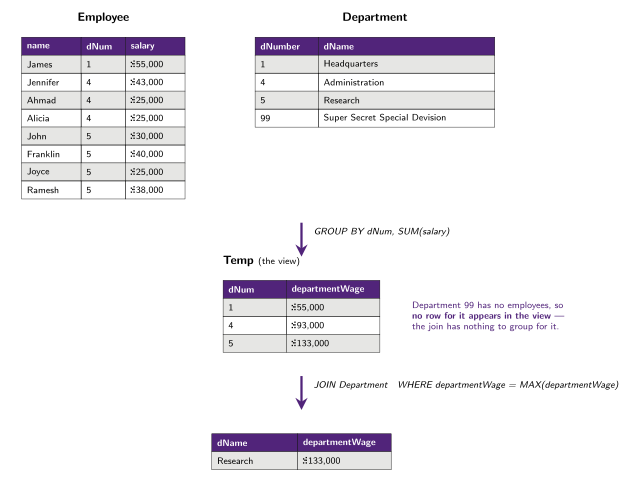
Figure 1: The worked view example, run on sample data: the per-department salary total is computed once into the view, and only then filtered down to the maximum. Department 99, a department with no employees, produces no row in the view at all, because the grouped join has nothing to group for it; a question phrased which department spends the most never notices, but one phrased list every department’s total would.
This is the standard way to answer “the group with the largest total” questions: a view holding one row per group with its aggregate, then a second query selecting the rows matching the extreme (sql-nested-queries covers the >= MAX(...) / >= ALL idioms that keep ties). Because a view definition is persistent, a script that recreates one should drop it first:
DROP VIEW IF EXISTS EarliestRoleGranting;

CREATE VIEW EarliestRoleGranting AS
SELECT   RoleID, MIN(TimeStamp) AS EarliestTimeStamp
FROM     RoleGranting
GROUP BY RoleID;

-- Who received each role first: join the base table back to the view
SELECT E.EmployeeID, E.FirstName, E.LastName, RG.RoleID
FROM   RoleGranting RG
JOIN   EarliestRoleGranting ERG
       ON ERG.RoleID = RG.RoleID AND ERG.EarliestTimeStamp = RG.TimeStamp
JOIN   Employee E ON E.EmployeeID = RG.EmployeeID;
That join-back pattern — aggregate in a view, then join the view to the base table on the aggregated value — is how you retrieve the rows that achieve an aggregate, which a GROUP BY alone cannot give you (sql-aggregation-and-grouping).
Updating through a view
A view has no rows of its own, so view updates must occur at the base tables — and working out which base rows an update to a view row should touch is ambiguous and difficult. Consider DepEmpStatus above: its avgSalary column is an average over many employees, so an instruction to change it names no particular salary to change, and its employeeNumber column cannot be changed at all without inventing or destroying employees.
DBMSs therefore restrict view updates to some simple views on single tables, which are the ones called updatable views. The characteristic shape is a view that selects a subset of the rows and columns of one base table, with no join, no grouping and no aggregate, so each view row corresponds to exactly one base row.
That restriction is what makes the security case in the table above practical rather than read-only: the manager of each department can be given a view of the employees of their department, and because it is a plain row-and-column slice of one table, they can access and edit through it.
Dropping views
DROP VIEW [IF EXISTS] view_name [, view_name] ... [RESTRICT | CASCADE];

DROP VIEW DepEmpStatus;
Dropping a view does not affect any tuples of the underlying relation — only the definition goes away. That asymmetry is the whole point of a virtual view: nothing of the data lives in it.
Views do, however, constrain what can be done to the tables under them: DROP TABLE … RESTRICT drops the table unless there is a view on it, while DROP TABLE … CASCADE drops the table and recursively drops any view referencing it (see sql-ddl).