Version Control
A Week 4 supplementary topic, and the only one in the course that isn’t about Java. Not examinable (confirmed in 2026-05-28-course-summary-and-exam-preparation) — but it’s the piece of the course you’ll use every day afterwards.
Why
Software changes frequently, and version control preserves the history of those changes. The everyday shape of the thing is a word processor’s version-history sidebar: a list of edits, each entry timestamped and attributed to a named collaborator, with a Restore this version button.
The alternative most students reach for — copying files into another directory — is incredibly error prone. It ends up as a folder of Super Cool Report v1.xlsx … v3.1 … v4a … v4b … vFinal … vFinal_1 … vFinal_Final … vFinal_Final-UPDATED_NEW.xlsx, or a set of directories running project-v0.1 through project-v2.3 with a project-v2.1-backup wedged in the middle.
In real development we want three things that copying can’t give us:
- To work on our own version and send changes back (commit) when they work. We don’t want everyone editing the same code in real time; the software would rarely compile while others were working on it.
- Labelled changes — a record of what changed and why, so bad changes are easy to find and undo. Changes frequently introduce new bugs.
- To work with any text files, not just source.
What a VCS does
A version control system tracks a folder and its contents, the history of changes within it, and metadata about that history (when a change was made, and by whom). History is recorded as snapshots — the entire contents of the folder at one point in time.
Benefits in this course:
- Inspect old versions of your code — “this was working before!”
- Identify what you changed recently — and remember, be suspicious of recently changed code when debugging (see week5-lab-debugging).
- Practice for your future career.
Terminology
| Term | Meaning |
|---|---|
| Version control | Tracking the history of changes such that old versions can be restored |
| Repository | A folder placed under version control |
| Commit | A snapshot of a repository at a point in time |
| History | A list of commits in a repository |
By market share: Git 93.87%, Subversion 5.17%, none 4.31%, Mercurial 1.13%.
When to commit
Commit when you create something that works, or fix something that was broken.
| Commit | Do not commit |
|---|---|
Finished the dependencies method of addCustomer |
It’s 5 o’clock |
Fixed the code style of AddressBook |
Changing to a new computer |
Fixed a bug in Farm.core |
Completed the assignment |
Fixed a typo in the description of the update method |
The pattern: the left column describes a change to the code; the right column describes something that happened to you. A commit message should be about the former.
The staging area
To prepare a commit you add your changes to the staging area — the middle ground between what you have done to your files (the working directory) and what you last committed.
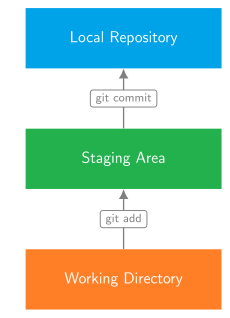
Figure 1: The three places a change can be, and the one command that moves it between each pair. This is the whole reason the staging area is a separate idea: git add does not save anything permanently and git commit does not look at your files, it looks at what you staged.
What should be committed?
Not everything in a folder belongs in version control. A repository should contain everything required to build or run the project, and not more.
- Beware generated files — if you don’t edit the file, don’t commit it.
- Beware proprietary formats like PowerPoint or Word documents — if your file is not plain text, consider leaving it out.
- Tell Git what to skip with a
.gitignore.
Common commands
| Command | Does |
|---|---|
git init |
Create a new Git repository |
git add |
Add working changes to the staging area |
git commit |
Commit the changes in the staging area |
git log |
View the repository history |
git diff |
View working changes |
Remotes — and a warning
A repository can be stored on a remote site; popular ones are GitHub, GitLab and BitBucket. An account with a lot of contributions can look good on a resume, but the rule that matters here is:
Do not make assessment public on these websites.
Publishing coursework counts as showing your code, which csse2002 lists explicitly under misconduct.
Further learning
Git is a powerful tool you’ll use extensively, and there is much more to it than the above. To go further, use the Git edX courses (accessible with a UQ student account) and the Atlassian Git tutorials.