Python String Methods
Strings are objects with built-in methods — callable via obj.method() syntax, unlike free functions. The receiver goes before the dot, and the parentheses are required even with no arguments: capitalize("hello") is a NameError, "hello".capitalize() is 'Hello'.
Review all of them with help(str), or a specific one with help(str.<name>). In the pager, Enter scrolls and q quits.
Reading a method’s help
Square brackets in a signature indicate optional parameters, and the rule recurses:
S.find(sub[, start[, end]]) -> intmeans sub is required, start is optional, and end is optional but only meaningful once start is given. So find("I"), find("I", 1) and find("I", 1, -1) are the three legal shapes, and find(1, -1) is not one of them.
A signature written the other way, with a default value shown, means the same thing:
center(self, width, fillchar=' ', /)self is the receiver (the string before the dot), fillchar is optional with default ' ', and the trailing / marks the end of the positional-only parameters.
Common string methods
| Method | Description |
|---|---|
s.find(sub[, start[, end]]) |
Lowest index where sub occurs in s[start:end], or -1 |
s.title() |
Title-cased version of s |
s.center(width, fillchar=' ') |
Centre s in a string of length width |
s.split(sep=None) |
Split s on sep (default: any whitespace) into a list |
sep.join(xs) |
Join a list of strings xs, placing sep between each |
s.strip(chars=None) |
Remove leading/trailing whitespace (or chars) from s |
>>> "team".find("I", 1, -1)
-1
>>> "a tale of two cities".title()
'A Tale Of Two Cities'
>>> "spam".center(10, "x")
'xxxspamxxx'
>>> "a, b, c".split(", ")
['a', 'b', 'c']
>>> "xxx".join(["A", "B", "C"])
'AxxxBxxxC'
>>> "  123  \n".strip()
'123'
Three behaviours worth naming, because they are the ones that bite when processing files:
findreturns-1on failure rather than raising, so its result must be tested before it is used as an index.splitwith no argument splits on whitespace; with an argument, the argument is an arbitrary string, not a set of characters ("axbxc".split("bx")is['ax', 'c']).stripcounts\nas whitespace, which is what makes it the standard way to clean a line just read from a file.
split and join are inverses — via the separator
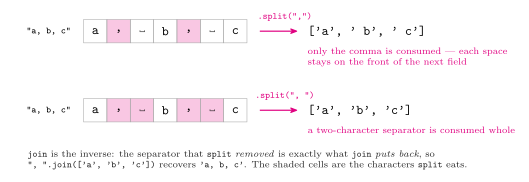
Figure 1: Which characters split actually removes, on a CSV-style example (splitting on a comma is useful for CSV processing). The separator is consumed, so splitting on a comma alone leaves each following space attached to the next field, and splitting on comma-space eats both, which removes the leading spaces. join is the exact inverse: it puts back between elements whatever split took out. The shaded cells are the characters split consumes.
center does not always split the padding evenly
center(width, fillchar) pads s out to width characters. When width - len(s) is odd the padding cannot be halved, and the extra fill character goes on the right:
>>> 'spam'.center(10, 'x')     # 10 - 4 = 6, split 3 / 3
'xxxspamxxx'
>>> '101'.center(20, 'x')      # 20 - 3 = 17, split 8 / 9
'xxxxxxxx101xxxxxxxxx'
See 2025-09-01-string-methods for a drawing of both cases.